/-/https/www.sciencebuddies.org/cdn/Files/21464/5/sb-logo.png)
/-/https/www.sciencebuddies.org/cdn/Files/21464/5/sb-logo.png)
Abstract
Did you know that the same digital photo you see on a computer monitor may not look as good in print? When it comes to color profiles, there are a lot of options: RGB, CMYK, grayscale and indexed color! How do you choose the right color profile for the job?Summary
Sara Agee, Ph.D., Science Buddies
/-/https/www.sciencebuddies.org/cdn/Files/12117/4/color-profile-thumbnail.jpg)
Objective
In this experiment you will investigate how different color profiles combine colors to produce an image.
Introduction
/-/https/www.sciencebuddies.org/cdn/Files/12117/4/color-profile-thumbnail.jpg)
When thinking about digital photography, it is important to know what you will use your photo for. You want your photo to look good whether it is online or in print. Why should this make a difference?
There is a fundamental difference between how color is produced on a screen and by a printer. A screen lights up from behind, and shines the color out of the screen towards your eyes. A printer lays a pigment down on a sheet of paper (usually white) that will block some light from reflecting back to your eye. One process is additive (screen) and one is subtractive (paper).
/-/https/www.sciencebuddies.org/cdn/Files/2467/3/Photo_img023.gif)
The left diagram shows subtractive color space with a black square and three overlapping circles colored red, green and blue. Different colors appear where the circles overlap and the center is colored white in the area that all three circles combine. The right diagram shows additive color space with a white square and three overlapping squares colored cyan, magenta and yellow. Different colors appear where the squares overlap and the center is colored black in the area that all three squares combine.
Here you can see the difference between an additive (rgb) and subtractive (cmyk) color space. (digital expert, 2005)
Each color profile uses separate color channels that are combined to produce the final full color image. How does this work? In this experiment you will investigate two different color profiles, RGB Color and CMYK Color. Which color profile looks best on screen? Which one prints the best photos? You will dissect a full color image and learn to separate the individual color channels. What do the individual color channels look like?
Terms and Concepts
To do this type of experiment you should know what the following terms mean. Have an adult help you search the internet, or take you to your local library to find out more!
- Color Profile
- RGB color (Red, Green, Blue)
- CMYK color (Cyan, Magenta, Yellow, Black)
- Color Channels
- Color Mixing
Questions
- How do the separate color channels mix together to form an image?
- What do the individual color channels of an RGB color image look like?
- What do the individual color channels of a CMYK color image look like?
Bibliography
- Morton, J. (n.d.). Color Systems - RGB & CMYK. Color Matters. Retrieved April 14, 2014.
- Wilson, T.V., Nice, K., and Gurevich, G. (2005). How Digital Cameras Work. HowStuffWorks, Inc. Retrieved April 24, 2006.
Materials and Equipment
- computer
- Adobe Photoshop. You can download a free trial of Photoshop from https://www.adobe.com/products/photoshop/free-trial-download.html. Note that other popular image editing programs like GIMP, may require third-party plugins to support CMYK color. The directions for this project will assume you are using Adobe Photoshop.
- your favorite photo
- color printer
- photo quality printing paper
Experimental Procedure
/-/https/www.sciencebuddies.org/cdn/Files/20483/6/icon-flask.png)
- On your desktop, create a new folder called "My Photo Experiment" and place a copy of your favorite photo in the folder.
- Open the photo in Adobe Photoshop.
- To view the color profile for the image, click "Image" and then "Mode" from the file menu.
- You will see a list of color profiles with a check next to "RGB" or "CMYK" indicating the current color profile.
- To begin this experiment, we will start by using RGB color, because it only has three color channels. If the current profile is not RGB then click on "RGB" to select and change the color profile to RGB color.
- Click on "File" and "Save As" to save this picture as a new file in the folder on your desktop named "My Photo Experiment", naming the file with the letters "RGB" at the end (like "puppyRGB"). Keep all of the settings and file extensions the same.
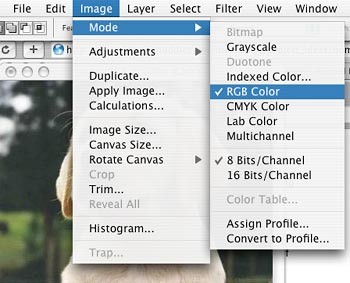
A cropped screenshot from Adobe Photoshop showing image color modes. Color modes can be selected by choosing Image and Mode from the main menu in Photoshop. Under color mode, "RGB Color" and "8 bits/Channel" are selected.
- Print the picture on photo quality paper. This is your composite image, and includes all of the color channels.
- Next, you are ready to view each individual color channel separately.
- Click "Image" then "Adjustments" and then "Curves" from the file menu.
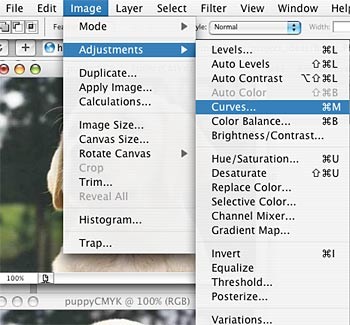
A cropped screenshot from Adobe Photoshop showing image adjustment options. Adjustments can be found under Image Adjustments in the main menu.
- You will see a dialog box that has a square with a diagonal line running across it. Play around by clicking, moving and stretching the line to see what it does to change the image. When you are done experimenting click on "Cancel" and re-open the dialog box.
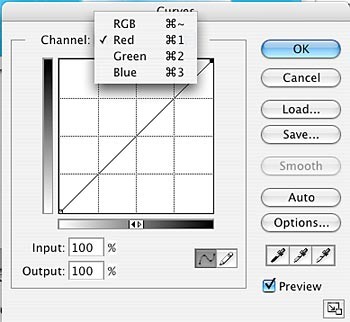
A cropped screenshot of the curves dialog box in Adobe Photoshop. A drop-down menu in the dialog box shows 4 separate color channels: RGB, Red, Green and Blue. The center of the box includes a 4 by 4 grid with a diagonal line running from the bottom-left to the top-right. Moving the line changes the color values of the selected channel.
- In RGB color, you will have three color channels. To isolate one color channel (Red), you will turn down the other two color channels (Green and Blue).
- To see the Red channel:
- Click "Green" from the drop down menu, click on the top right hand corner of the line and drag it to the bottom right corner.
- Then click "Blue" from the drop down menu, click on the top right hand corner of the line and drag it to the bottom right corner.
- Click "OK" and the dialog box will close. Your picture should look strange. This is your Red channel image, and does not have any of the Green or Blue color information in it.
- Click on "File" and "Save As" to save this picture as a new file in the folder on your desktop named "My Photo Experiment", naming the file with the letters "Red" at the end (like "puppyRed"). Keep all of the settings and file extensions the same.
- Print the picture on photo quality paper.
- Close this image and re-open the RGB image from the desktop folder (puppyRGB).
- Repeat steps 9-16 for each remaining color channel.
- To see the Green channel:
- Click "Red" from the drop down menu, click on the top right hand corner of the line and drag it to the bottom right corner.
- Then click "Blue" from the drop down menu, click on the top right hand corner of the line and drag it to the bottom right corner.
- To see the Blue channel:
- Click "Red" from the drop down menu, click on the top right hand corner of the line and drag it to the bottom right corner.
- Then click "Green" from the drop down menu, click on the top right hand corner of the line and drag it to the bottom right corner.
- Arrange your four photos in a row and compare. How do the individual color channels resemble the composite image? How are they different? Does each color channel look the way you expected it to? How do you think they form the composite image when put together?
- To compare how a color image is made in CMYK using four color channels (Cyan, Magenta, Yellow and Black), change the color profile to "CMYK" and repeat the experiment.
- How do the two methods compare? Do any of the individual color channels in RGB look like one of the CMYK channels? Do the composite images look the same or different?
/-/https/www.sciencebuddies.org/cdn/Files/2468/3/Photo_img024.jpg)
/-/https/www.sciencebuddies.org/cdn/Files/2469/3/Photo_img025.jpg)
/-/https/www.sciencebuddies.org/cdn/Files/2470/3/Photo_img026.jpg)

Ask an Expert
Variations
- Another interesting component of a digital image is the saturation and contrast of the image. To investigate these topics see the Science Buddies project ideas Color Saturation and Digital Photo Contrast for more ideas.
- You can investigate the physics of color mixing using paints or a color wheel. How to some colors mix to form other colors? Which colors are pure colors? Which colors are mixtures of other colors?
- You can also investigate the physics of light waves and color by using prisms. How do prisms separate the colors of light? Can you use containers of water as a color prism? What wavelengths of light correspond to the different colors of the visible spectrum?
Careers
If you like this project, you might enjoy exploring these related careers:
/-/https/careerdiscovery.sciencebuddies.org/cdn/Files/1907/18/pexels-photo-3153207.jpg)

/-/https/careerdiscovery.sciencebuddies.org/cdn/Files/18382/4/film-editor.jpg)

/-/https/img.youtube.com/vi/yBgMJssXqHY/0.jpg)
/-/https/img.youtube.com/vi/xx5ou6n0GEU/0.jpg)
/-/https/img.youtube.com/vi/PenQ1zuphJU/0.jpg)