/-/https/www.sciencebuddies.org/cdn/Files/21464/5/sb-logo.png)
/-/https/www.sciencebuddies.org/cdn/Files/21464/5/sb-logo.png)
Ask an Expert Guidelines
If you have never used the forum before, please read the Do's and Don'ts as well as the brief How to Get Started below.
Do's and Don'ts
- Do look at other resources on our site before asking a question. Check out How to Do a Science Fair Project. If you're having trouble getting started, try the Topic Selection Wizard.
- Do be specific and complete. Describe the background of your project. Then ask your question. Don't assume our experts can read your mind! They try, but haven't been able to do it yet.
- Do use proper English. You're communicating with adults who may not understand the codes you use in a chatroom.
- Do be polite. Volunteers really appreciate it when someone tells them, "Thank you."
- Don't ask "What project should I do?" That's a question only you can answer. It is OK to ask something like, "I think project A has this advantage... and project B has this advantage. In your experience, which of those advantages would lead to the best science fair project?" That's a question our experts can help with.
- Don't ask homework questions. Our experts are volunteering to help with your science project, not do your problem sets.
How to Get Started
- Step 1:
If you have never used "Ask an Expert" before, you must first register by creating a Science Buddies account.
Please register on the Ask an Expert Forums by visiting the
Ask an Expert Board Index
and clicking the "Log In" link at the top right of the page.
At the conclusion of registration,
an activation key will be sent to the email address you provide. Your e-mail will describe how to activate your account.
- Note #1: Depending on your email system, it may take anywhere from 1 minute to more than an hour to receive your email.
- Note #2: You only need to do the registration step the first time. On subsequent visits, simply log in with your Science Buddies account.
- Step 2: Once you have logged in (or activated your account), click on the appropriate grade level forum and
then choose a forum, based on area of science, to read or post messages.
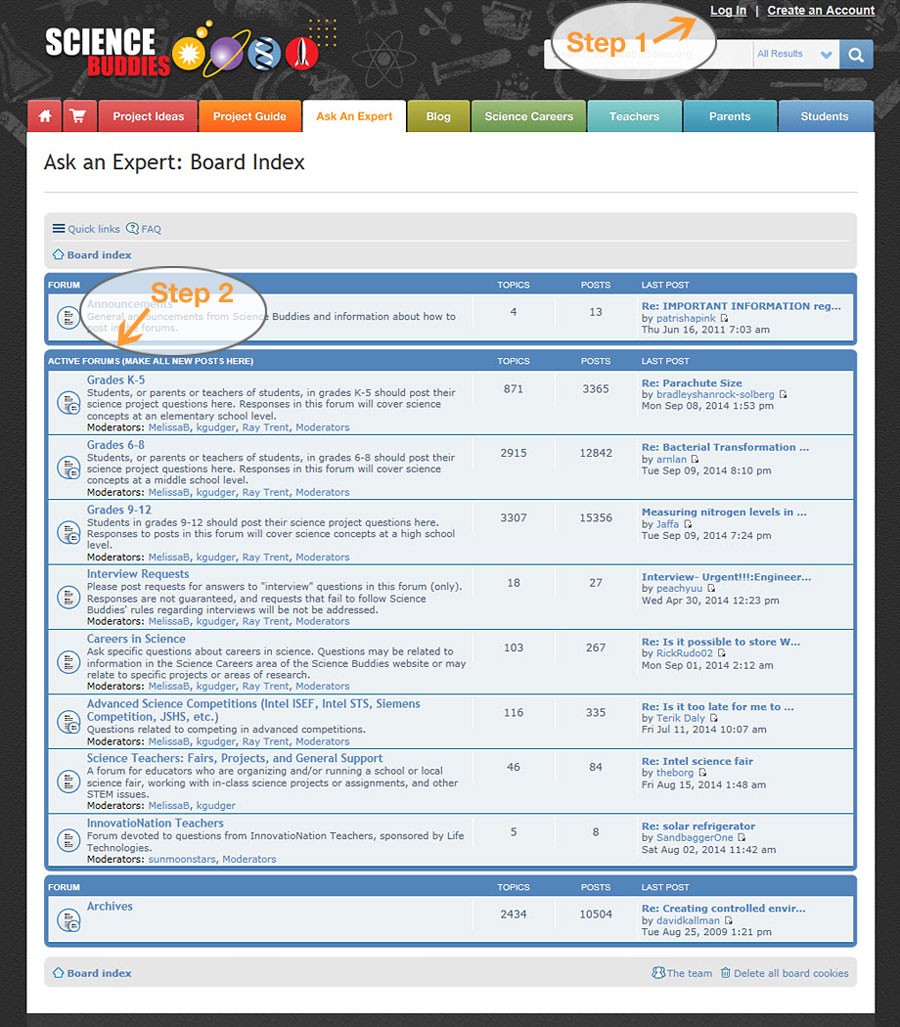
A screenshot of the Ask an Expert forum on the website ScienceBuddies.org shows a log in link at the top-right of the page and a list of forum topics. The active forums on the index page are separated into categories by grade level, interview requests, careers in science and advanced science competitions.
- Step 3: From within the forum, click on the "New Topic" icon to ask a new question. When viewing a topic, you can click the "Post Reply" icon to reply to an existing message.
- Step 4: You can click on the "FAQ" icon to get help on other features of the bulletin board.
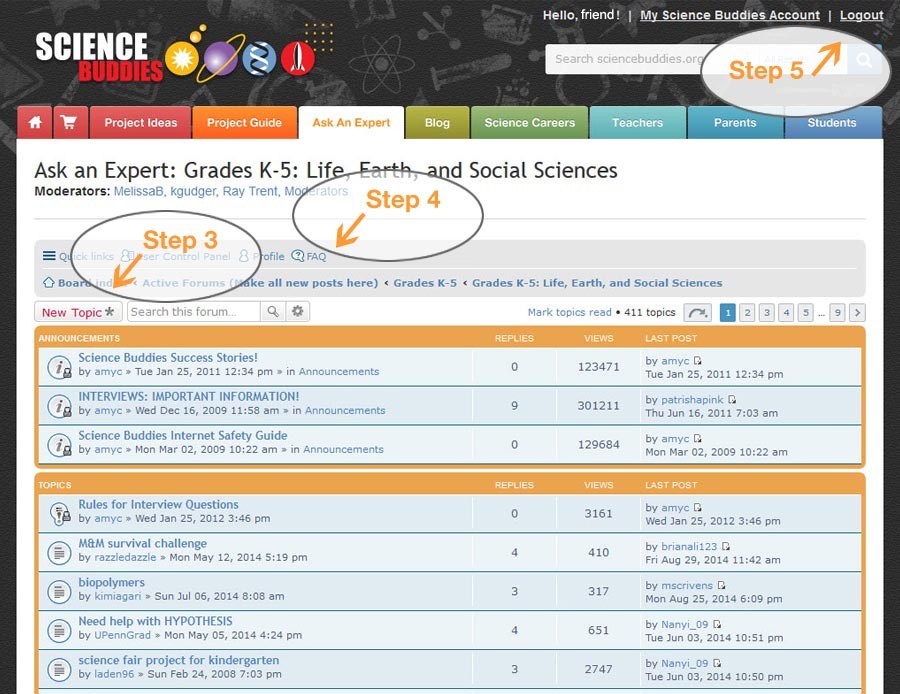
A screenshot of subject specific posts in the Ask an Expert forum on the website ScienceBuddies.org highlights areas of interest on the forum. The page includes a new topic button (above the forum posts), an FAQ link (on the right of the forum posting navigation bar) and a logout link at the top-right of the page.
- Step 5: When you are done, please log out by clicking the "Logout" link at the top right of the page.
/-/https/www.sciencebuddies.org/cdn/Files/7307/11/AAE_boardindex.jpg)
/-/https/www.sciencebuddies.org/cdn/Files/7308/12/AAE_newtopic.jpg)
Ready to Begin?
Click the button below to log in and enter Ask an Expert.
/-/https/img.youtube.com/vi/tTPIdqicIC0/0.jpg)
/-/https/img.youtube.com/vi/aAuN5ZnL4yE/0.jpg)
/-/https/img.youtube.com/vi/dt_eIeKJYbE/0.jpg)