Page 1 of 1
Using Laser Pointer to Measure Data Track Spacing on CD &DVD
Posted: Fri Apr 03, 2015 11:56 pm
by B-East
Hi! I have already done the experiment and gotten results. But when I tried analyzing them, I realized something was wrong in my experiment and I believe the source of error is the angle of incidence. I usually get an angle of incidence around 1 - 2. I have some questions about this project.
One is that, is an angle of incidence of 0 possible? I'm not able to get an angle of incidence any larger than 3. How do you get for instance, an angle of 70? In the procedure, it said:
Direct the laser pointer beam down the face of the index card, and align the beam with the center of the protractor... Make your adjustments carefully, keeping the beam as close to parallel with the card as possible.
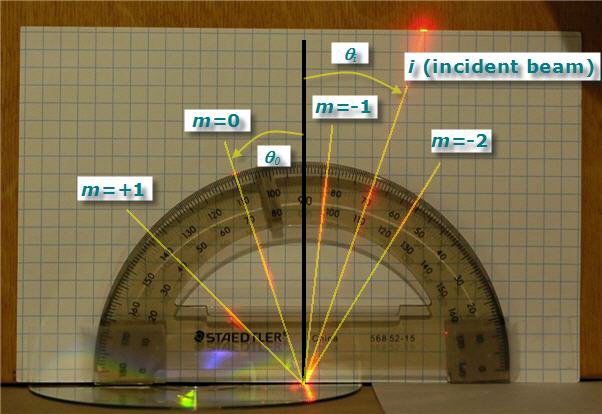
So how do I get an angle of incidence such as in the given picture in the procedure:
https://www.sciencebuddies.org/Files/21 ... img008.jpg when the laser beam has to be aligned with the center of the proctractor and also has to be parallel with the card?
My next question is, if doing different types of CDs and DVDs (e.g. blank, music, movie), the control would be the blank one, right? Although if I only test
a CD and
a DVD or types of CDs and DVDs but no blanks, would that mean there would be no control group?
And lastly, what is the significance of this project? If the data we're comparing our results to can be found on the Internet, what
is the purpose of doing this?
My Physics teacher hasn't really exactly given us an official due date. However, he's been talking about bringing in our boards a
lot of times so I think it's pretty close. Can anyone help me answer these questions? I'd truly appreciate it.
Re: Using Laser Pointer to Measure Data Track Spacing on CD
Posted: Tue Apr 07, 2015 4:40 pm
by norman40
Hello B-East,
I'm not familiar with the procedures for this project but I think that you choose your angle of incidence. It seems that 70 degrees would be a good choice because this angle should allow you to see several diffracted light beams.
Do you have your protractor set up in front of the index card with a space between the card and the protractor? If so, I suggest aiming the laser at point on the CD or DVD that is at the bottom edge of the protractor and directly below the 90 degree mark.
Regarding your next question, a blank CD or DVD would represent a control. And you are correct that you'd have no control group if you only measure CDs and DVDs that have been recorded.
I think the significance of this project is that you can use light to make a variety of measurements. In this case it is a tiny distance between tracks on a CD or DVD. How else could you measure such a small distance?
I hope this helps. Please post again if you have more questions.
A. Norman
Re: Using Laser Pointer to Measure Data Track Spacing on CD
Posted: Wed Apr 08, 2015 2:11 am
by B-East
Thank you so much for replying!
I do have set it up just like you said. I now understand that I don't have to align the laser beam with the center of the protractor to get different incident angles. I just have one clarification. It stated in the procedure that the m=1... is on the opposite side of the incident angle and the m=-1.. is on the same side. What if the incident angle is zero, where would the m=-1.. and m=1.. be ? Or would there only be positives? I'm confused with this.
Thanks again, I never thought about that of light.
Re: Using Laser Pointer to Measure Data Track Spacing on CD
Posted: Wed Apr 08, 2015 6:48 am
by norman40
Hello B-East,
Based on the definitions given in the project description an incident angle of 0 degrees means that your laser beam would be perpendicular (at 90 degrees) to the surface of your CD or DVD.
The convention described in the project for the refracted beam order is m=negative for beams on the same side of the normal as the incident beam. M=positive for beams on the opposite side of the normal from the incident beam.
An incident angle of 0 degrees is a special case where you have symmetry on both sides of the normal (at 90 degrees). Due to the symmetry, you could define m=positive on either side of the normal when the incident angle is 0 degrees. The opposite side of your choice for m=positive would be m=negative.
I hope this helps. Please post again if you have more questions.
A. Norman
Re: Using Laser Pointer to Measure Data Track Spacing on CD
Posted: Wed Apr 08, 2015 10:36 am
by B-East
Yes! Thank you for clarifying it for me. However, I'm confused about the last thing you said:
The opposite side of your choice for m=positive would be m=negative
Is that to refer generally or to the incident angle of 0 degrees? Because if it's the latter, then I don't understand.
One more thing. I always only get 2 diffracted rays for DVDs and more for the CDs. When recording data in a table, instead of only putting in two diffracted rays, can I just put in zero for whatever diffracted rays are missing or is it going to affect the data?
Again, thank you for replying.. I understand a little bit more now.
Re: Using Laser Pointer to Measure Data Track Spacing on CD
Posted: Thu Apr 09, 2015 2:44 pm
by norman40
Hi B-East,
I'm sorry for any confusion about my previous post.
I re-read the definitions for the order (the m's) of diffracted rays given in the project background section. The order is positive for rays farther from the normal than the reflected beam (which has the same angle as the incident beam). Rays closer to the normal than the reflected beam have negative orders.
When the incident angle is 0 degrees, the incoming beam at the same angle as the normal. Any refracted beam would have to be farther away from the normal than the reflected beam (it's angle also would be 0 degrees). So you'd have only m=positive for an incident angle of 0 degrees.
On your second question, you should not put in zeros for the missing data. You should record the observations you can make and use them in your calculations. Because you see more rays for the CDs, you'll have more results to average than you will for the DVDs. Did you try different angles of incidence for the DVDs to see if you could get more diffracted rays?
I hope this helps. Please post again if you have more questions.
A. Norman
Re: Using Laser Pointer to Measure Data Track Spacing on CD
Posted: Mon Apr 20, 2015 9:11 am
by B-East
Well, okay. I've gathered all the data now although I'm confused with some parts.. So if for instance, I recorded the m-3 for a CD but I wasn't able to on a DVD.. Do I still include it on the final data (and leave that data for the DVD as blank or should I only use data that's both present on the CD and DVD? If yes, how do I calculate the average? Do I only divide the data that is present or should I count the "missing" data as zero and include it when calculating the average?
Re: Using Laser Pointer to Measure Data Track Spacing on CD
Posted: Tue Apr 21, 2015 5:07 am
by norman40
Hi B-East,
Your measurements for the CD and the DVD are separate experiments. Because of this you should include all of the data you observed for the CD and for the DVD. And you should make separate track spacing calculations for the CD and for the DVD. You should get different track spacings for the CD and DVD.
My suggestion is to make a data table for the CD and one for the DVD. You should include all of the refracted beam data and your track spacing calculations for the CD in the CD data table. All of the data and track spacing calculations for the DVD should be in the DVD table.
Do not add zeroes for “missing” data. In this experiment, absence of a refracted beam order (say m=+3) is not “missing” data. That is, some refracted beam orders will not be observed. So you should only include data you observed. When calculating your average divide by the count of your actual data.
I hope this helps. Please post again if you have more questions.
A. Norman