/-/https/www.sciencebuddies.org/Files/21464/5/sb-logo.png)
/-/https/www.sciencebuddies.org/Files/21464/5/sb-logo.png)
I am doing the obstacle-avoiding robot project with the old instructions meant for the RedBot instead of the one with the BlueBot. I have assembled the entire chassis and completed the breadboard as well. However, when the sensor touches an object, the wheels move backward and then the robot starts to spin in place. I don't know what is wrong with the robot or how to fix it.
(And I cannot do the BlueBot experiment because I don't have any time to gather the materials and build a new robot.)
Obstacle-Avoiding Robot
Moderators: AmyCowen, kgudger, MadelineB, Moderators
-
deleted-330573
- Posts: 2
- Joined: Sat Dec 26, 2015 8:20 pm
- Occupation: Student
-
SciB
- Expert
- Posts: 2071
- Joined: Fri Feb 01, 2013 7:00 am
- Occupation: Retired molecular biologist, university researcher and teacher
- Project Question: I wish to join Scibuddies to be able to help students achieve the best science project possible and to understand the science behind it.
- Project Due Date: n/a
- Project Status: Not applicable
Re: Obstacle-Avoiding Robot
This is the life sciences forum and we like bots but aren't very experienced in building or troubleshooting them.
It sounds like the servo in one wheel may not be wired right. Are both wheels turning when the bot spins? How far backwards does it go before it spins? If one wheel stops or is going in the wrong direction, it will spin.
In my experience with breadboards, the problem is usually in the circuit, but it could be a defective controller.
If you haven't done so, post your question on the Physical Science forum. There are a lot more engineer geeks there who may be able to suggest something to troubleshoot your problem.
Good luck!
Sybee
It sounds like the servo in one wheel may not be wired right. Are both wheels turning when the bot spins? How far backwards does it go before it spins? If one wheel stops or is going in the wrong direction, it will spin.
In my experience with breadboards, the problem is usually in the circuit, but it could be a defective controller.
If you haven't done so, post your question on the Physical Science forum. There are a lot more engineer geeks there who may be able to suggest something to troubleshoot your problem.
Good luck!
Sybee
-
bfinio
- Expert
- Posts: 964
- Joined: Mon Aug 12, 2013 2:41 pm
- Occupation: Lead Staff Scientist, Science Buddies
- Project Question: Expert
- Project Due Date: n/a
- Project Status: Not applicable
Re: Obstacle-Avoiding Robot
Hi tennisfreak783,
I'll answer your question here even though Sybee is right, in the future the life-sciences forum isn't the right place for robotics questions.
If you are using the original Redbot directions, then I believe you are using this bump sensor from SparkFun:
https://www.sparkfun.com/products/11999
If I remember correctly, these sensors can get "stuck" pretty easily - meaning when the robot bumps into something, the sensor will get stuck in place (causing one wheel to go in reverse continually, making the robot spin in circles); instead of springing back to its original position like it's supposed to (in which case the robot will start driving forward again). This is part of why we switched to different sensors that work better for the new Bluebot.
There's a detailed guide for assembling the sensor on SparkFun's page:
https://learn.sparkfun.com/tutorials/re ... al-bumpers
In particular, pay very close attention to the gap between the "whisker" at the nut, represented by the dashed line in this image:
https://cdn.sparkfun.com/r/600-600/asse ... 8b456f.jpg
The objective is for the whisker to temporarily touch the nut when it comes in contact with an object, then spring back. But if that gap is too small, or the spacer holding the whisker in place is too loose, it might not spring back into place. So, you might have to tinker with the sensor a bit to get it to work properly.
I believe that will be the explanation in your specific case. However, Sybee is right that in general, you should always double-check your breadboard connections if you see weird behavior from your robot. I see examples all the time where students swear that they have already double and triple-checked their wiring, but it still turns out that they have just one wire in the wrong place, which will prevent the robot from working properly.
Good luck!
Ben
I'll answer your question here even though Sybee is right, in the future the life-sciences forum isn't the right place for robotics questions.
If you are using the original Redbot directions, then I believe you are using this bump sensor from SparkFun:
https://www.sparkfun.com/products/11999
If I remember correctly, these sensors can get "stuck" pretty easily - meaning when the robot bumps into something, the sensor will get stuck in place (causing one wheel to go in reverse continually, making the robot spin in circles); instead of springing back to its original position like it's supposed to (in which case the robot will start driving forward again). This is part of why we switched to different sensors that work better for the new Bluebot.
There's a detailed guide for assembling the sensor on SparkFun's page:
https://learn.sparkfun.com/tutorials/re ... al-bumpers
In particular, pay very close attention to the gap between the "whisker" at the nut, represented by the dashed line in this image:
https://cdn.sparkfun.com/r/600-600/asse ... 8b456f.jpg
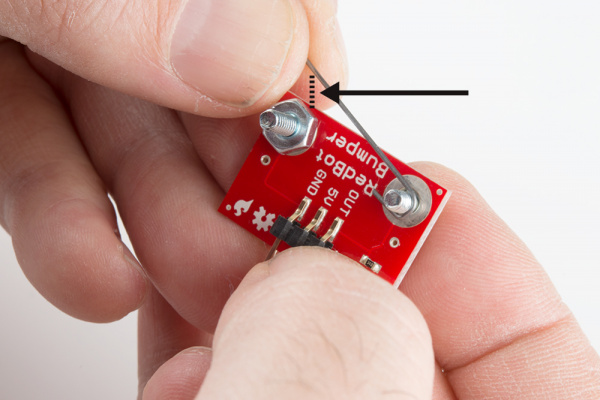
The objective is for the whisker to temporarily touch the nut when it comes in contact with an object, then spring back. But if that gap is too small, or the spacer holding the whisker in place is too loose, it might not spring back into place. So, you might have to tinker with the sensor a bit to get it to work properly.
I believe that will be the explanation in your specific case. However, Sybee is right that in general, you should always double-check your breadboard connections if you see weird behavior from your robot. I see examples all the time where students swear that they have already double and triple-checked their wiring, but it still turns out that they have just one wire in the wrong place, which will prevent the robot from working properly.
Good luck!
Ben