/-/https/www.sciencebuddies.org/Files/21464/5/sb-logo.png)
/-/https/www.sciencebuddies.org/Files/21464/5/sb-logo.png)
Happy or Sad? Exploring Bias in Machine Learning
Summary
/-/https/www.sciencebuddies.org/Files/18126/9/examples-testing-teachable-machine.jpg)
Overview
Classifying happy and sad faces is an easy task for most humans, but can we teach a machine to do it? In this fun lesson, students will use machine learning to try this out and see how easy it is for bias to creep in. This experiment requires no computer programming skills! In an optional extension, students will also use their imaginations to explore the potential benefits and dangers of artificial intelligence solutions. This lesson will give students an awareness of how prevalent artificial intelligence is, see its benefits, and realize its challenges.
Remote learning adaptation: This lesson plan can be conducted remotely. Students can work independently on the Explore section of the lesson plan using the Student Worksheet and the slides as guides. The Engage and Reflect sections can be conducted over a video chat. The optional reflect section can be done remotely.
Learning Objectives
- Know that machine learning is a type of artificial intelligence (AI).
- Train and test a machine learning tool to classify drawings of happy and sad faces.
- Give examples of a bias that can arise in machine learning and understand how biases may arise.
- Revise the learning data to reduce bias and increase accuracy.
- Recognize that new AI inventions can help people but can also have unintended effects.
NGSS Alignment
This lesson helps students prepare for these Next Generation Science Standards Performance Expectations:- MS-ETS1-1. Define the criteria and constraints of a design problem with sufficient precision to ensure a successful solution, taking into account relevant scientific principles and potential impacts on people and the natural environment that may limit possible solutions.
- MS-ETS1-2. Evaluate competing design solutions using a systematic process to determine how well they meet the criteria and constraints of the problem.
|
Science & Engineering Practices
Planning and Carrying Out Investigations.
Collect data about the performance of a proposed object, tool, process or system under a range of conditions.
Analyzing and Interpreting Data. Analyze and interpret data to provide evidence for phenomena. |
Disciplinary Core Ideas
ETS1.B: Developing Possible Solutions.
A solution needs to be tested, and then modified on the basis of the test results, in order to improve it.
|
Crosscutting Concepts
Influence of Science, engineering and Technology on Society and the Natural World.
The use of technologies and any limitations on their use are driven by individual and societal needs, desires, and values; by the findings of scientific research; and by differences in such factors as climate, natural resources, and economic conditions. Thus, technology use varies from region to region and over time.
|
Materials
/-/https/www.sciencebuddies.org/Files/18127/6/machine-learning-materials-.jpg)
For each group of 2–3 students.
- Face template, 1 per student and one extra per group.
- Pencil
- Scissors
- Construction paper, the same color for all groups.
- Coloring pencils, crayons, or markers
- Access to a computer with a webcam. [Note: cell phones and tablets will not work. Instead of a webcam, digital photos can be taken with another device and uploaded, but this will take more time. ]
- Access to the internet, specifically, the Teachable Machine web page.
Background Information for Teachers
This section contains a quick review for teachers of the science and concepts covered in this lesson.Artificial intelligence (AI) is a branch of computer science that tries to build machines that demonstrate intelligence. Machine learning is a sub-division of AI; its goal is to create machines that can improve and learn over time using data.
/-/https/www.sciencebuddies.org/Files/18128/19/artificial-intelligence-fields.png)
Figure 1. Machine learning is a branch of artificial intelligence and is part of computer science.
A widely used machine learning application is image recognition. In image recognition, a computer learns to classify images by analyzing and finding patterns. AIs that use image recognition can do many things like classifying cancerous from non-cancerous tissue in medical images or recognizing a person's face in digital pictures. Interactions with the outside world, for example, a doctor re-classifying an image that the program wrongly classified as cancerous, can help the application refine and improve the accuracy of its algorithm.
Unlike classical computer programs where the decisions and rules are built into the program, machine learning programs construct their algorithm from data and feedback. This allows machine learning programs to find trends and patterns in enormous quantities of data, including patterns that are hard for humans to catch. They can also make predictions and improve themselves without human intervention and can handle complex, changing environments. But machine learning has its limitations. It requires a neutral and complete set of data to learn from, it uses a lot of computer power, and the results need to be taken with some precaution as it is susceptible to systematic errors.
In machine learning, a repeatable and systematic error that favors a specific incorrect outcome is referred to as a bias. It can have a racial or gender component—for example, some commercial face recognition programs are more likely to misclassify female dark-skinned people compared to male light-skinned people—but it can also be as simple as misclassifying high heeled shoes more often than sneakers. The video Machine Learning and Human Bias explains how human bias can creep into machine learning tools.
/-/https/i.ytimg.com/vi/59bMh59JQDo/maxresdefault.jpg)
/-/https/www.sciencebuddies.org/Files/20511/4/google-classroom.png)
/-/https/www.sciencebuddies.org/Files/20512/4/ms-teams.png)
/-/https/www.sciencebuddies.org/Files/20469/4/Canvas_Bug_Color_RGB.png)
/-/https/www.sciencebuddies.org/Files/20470/5/Schoology-Logo.png)
/-/https/www.sciencebuddies.org/Files/20471/4/lms.png)
/-/https/www.sciencebuddies.org/Files/20469/4/Canvas_Bug_Color_RGB.png)
/-/https/www.sciencebuddies.org/Files/20470/5/Schoology-Logo.png)
/-/https/www.sciencebuddies.org/Files/20471/4/lms.png)
Learning to write a machine learning program takes dedication and work. Programmers have developed many ways to make machine learning more accessible, and Teachable Machine is one answer to these attempts. It is a web-based tool that allows users to quickly and easily make a teachable computer program without programming. It allows users with no computer programming background to experience the power of artificial intelligence.
In this lesson, students will develop an AI machine that can recognize drawings of happy and sad faces as shown in Figure 2.
Figure 2. Examples of happy and sad face classifications.
After building and testing their AI machines, students can use their first-hand experiences to imagine and explore the potential benefits and dangers of artificial intelligence solutions.
Additional Background Links
- Artificial Intelligence Explained in Simple Terms, My Take.
- Teachable Machine, Google. Scroll down to the "How do I use It" sections to find an explanation of the three steps with videos.
- Teachable Machine FAQ, Google.
Prep Work (15 minutes)
- Optional: Familiarize yourself with Google's Teachable Machine and the process the students will go through by following the instructions on the PowerPoint presentation slides 5–12.
Teacher Tool Box
Engage (5 minutes)
- A PowerPoint presentation is available to help present this lesson to your class. Introduce the topic (slide 2).
 How do you know if someone is happy or sad?
 Listen to the students' answers. If needed, ask what they can see, hear, or feel that tells them they are happy or sad.Do you think it is hard for people to know if someone is happy or sad just by looking at their face? What are some clues?Listen to the students' answers.
 - Introduce the activity (slide 3).
Today, you will teach a machine to classify drawings of happy and sad faces as "happy" or "sad." You will give the machine some examples to learn from and see how well it does.
Some students might think of "machines" as physical objects with moving parts. In this case "machine" refers to a computer program.
- Make a prediction.
How often do you think the machine will be wrong?Listen to the student's answers and ask students to record their prediction on their worksheet under question 1.
/-/https/www.sciencebuddies.org/Files/14174/23/note-question-mark-30.png)
/-/https/www.sciencebuddies.org/Files/14175/24/conversation-bubbles-30.png)
Explore (50 minutes)
- Create groups of 2–3 students.
- Identify the qualities of good learning data (slide 4).
Tell students:
Little kids learn to distinguish happy from sad faces by seeing examples. Similarly the machine will learn from examples of happy and sad faces we provide. The machine needs at least ten happy faces and ten sad faces as examples. We will refer to this set of examples as the learning data because your machine will learn from this set of drawings. In AI, the phrase training data is sometimes also used to refer to this data.
Your machine will only learn from the examples made by your group.
Ask students to discuss these questions in their group and record their conclusions on their worksheet under question 2:
What details do you think are essential when we draw examples to help the machine recognize a happy face or a sad face?
- Should we draw identical examples, or do you think it is better to have a variety of different happy faces in our example set?
- Should we include many details like hair style, earrings, freckles, etc., or should we focus on the features of the face that change when someone is happy or sad?
- Create learning data (slide 5).
Each group will draw examples to give to their machine as data to learn from.
- In groups with two or more students: each student in the group should draw happy faces in five circles of a face template and sad faces in the other five circles.
- If students work individually: the students should draw happy faces in all ten circles of the template and sad faces in ten circles of a second template.
- Once drawn, all faces should be cut out and each group should make a stack of happy faces and a stack of sad faces.
- Teach the machine (slide 6).
Help students navigate to the Teachable Machine new project web page. The layout of Teachable Machine for images is shown in Figure 3.
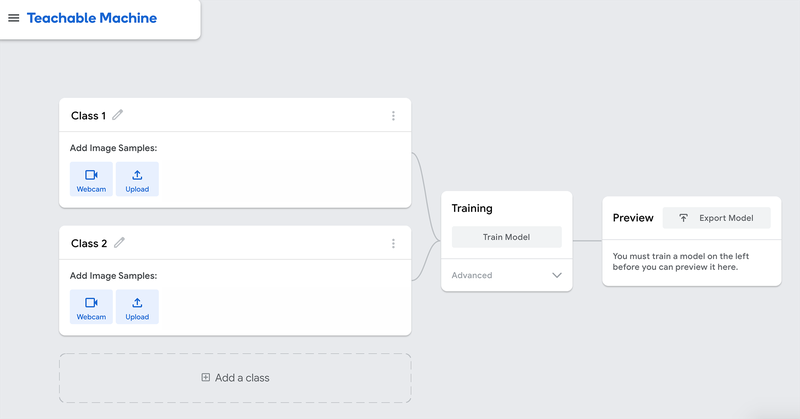
Figure 3. Teachable machine start page to train a machine to classify images. - Label the classes.
Tell students that their machine will classify drawings of faces into two groups or classes: happy faces and sad faces. Rename class 1 to "Happy" and class 2 to "Sad."
- Upload learning data (slide 7).
Ask the students to upload their happy face drawings to the "Happy" class and their sad face drawings to the "Sad" class.
If available, a webcam is the fastest, most direct way to upload pictures of drawings. If students are using devices that do not have a webcam, you can take pictures of or scan the drawings with another device, transfer the files to the computer, and upload them.
Tech tip: When using the webcam to take pictures in Teachable Machine, remember to click the "hold to record" button briefly. The device might take several pictures at once. That is fine. Try to have a similar number of pictures of each drawing. If needed, remove a few duplicates from your sample. The machine should have at least 20 pictures in each class. If there are less, use the same drawings to add more pictures.
Guidelines on taking pictures of the drawings:
- Place the drawing on a plain background like a sheet of colored construction paper, as shown in Figure 4, so the machine does not get distracted by the environment.
- Hold the drawing with background close to the lens, so the drawing fills most of the space.
- Take all the pictures with the camera at the same angle so the lighting stays constant.
- Try to keep your fingers out of the picture.
- Teachable Machine has a function that crops the pictures as you are taking them. This can help you crop your fingers out of the pictures.
- Try as best as you can to take every picture the same way.
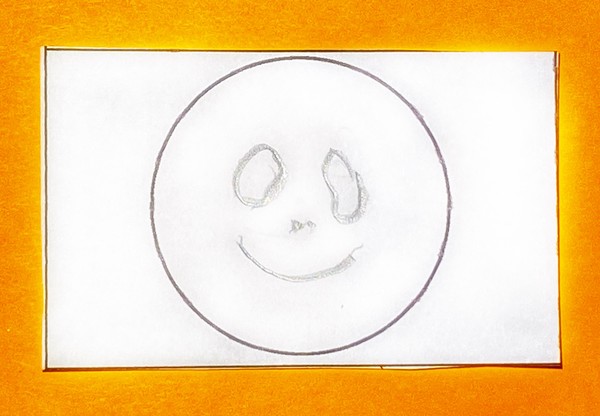
Figure 4. An example of a drawing ready to be uploaded to the "Happy" class.Figure 5 shows a complete set of learning data.
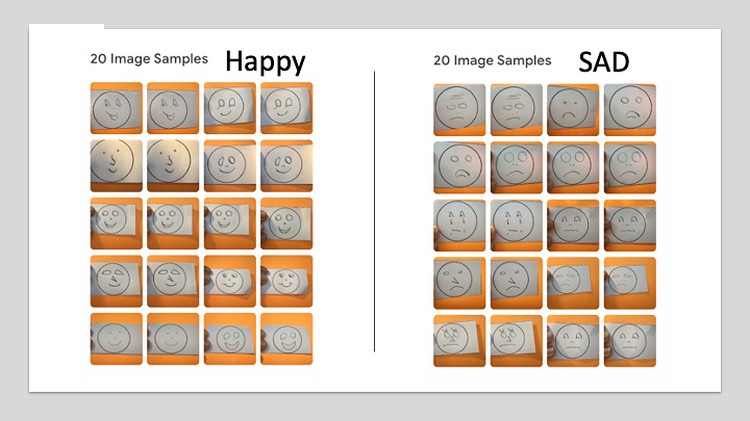
Figure 5. An example of learning data for a machine that will classify drawings of a face as happy or sad.The Teachable Machine Tutorial 1 can help you troubleshoot this step.
If students cannot finish the project in one session, the machine with all the uploaded data can be saved in Google Drive and later uploaded from the Drive to continue. Look for the commands "Save Project to Drive" and "Open Project from Drive" under the "Teachable Machine" menu. It will ask you to log in to a Google account.
The project can also be saved as a file on your computer and uploaded later. Look for the commands "Download project as file" and "open project from file" under the "Teachable Machine" menu.
- Train your machine (slide 9).
Start the machine's learning process by clicking on the "Training" button. The machine will take less than a minute to complete this step.
The Teachable Machine Tutorial 2 can help you troubleshoot this step.
- Explain machine learning (slide 9).
Explain to the students that the Teachable Machine is a computer program that can learn from examples. In a regular program, programmers tell the program exactly what to do in each situation. The thinking has already been done by the programmers. The opposite of this is artificial intelligence or AI. In AI, the program imitates human intelligence. One type of artificial intelligence is machine learning. In machine learning programs, like Teachable Machine, the programmers define what the program should do and give it learning data; the program then analyzes the data and looks for patterns that successfully help it complete the task.
Let's look at our task of classifying simple drawings of faces into "happy" or "sad". Can you think of a rule you use to classify your drawings?Most likely, the students look at the curvature of the mouth. The rule could be: If the mouth is curved up, it is a happy face; if the mouth is curved down, it is a sad face.So, you are looking for a curved up or a curved down line, correct?
Our brains can easily notice a line that's curved up or curved down and associate it with a happy or sad face, but it's difficult to write a computer program that can do the same thing. This is where AI comes in handy.
Let's say we use a computer program that can detect lines and curvature, how would you instruct a computer to detect if a drawing is happy or sad? What rule can we give the computer?Listen to the students' ideas. A few examples are:- If you detect a line that is curved up, the face is happy.
- If you detect a line that is curved down, the face is sad.
- If you detect a line that is curved up, the face is happy, if not, the face is sad.
Write the agreed upon algorithm down on the whiteboard, then sketch the drawings shown in Figure 6 on the whiteboard or show slide 10 of the power point presentation.
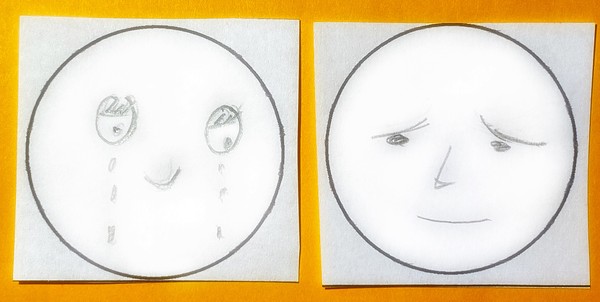
Figure 6. Two simple drawings of sad faces that have upward curving lines in the face.Using our rule, how would a program classify these drawings? How would you classify them?Listen to the students' ideas. Highlight the upward curving lines in the drawings.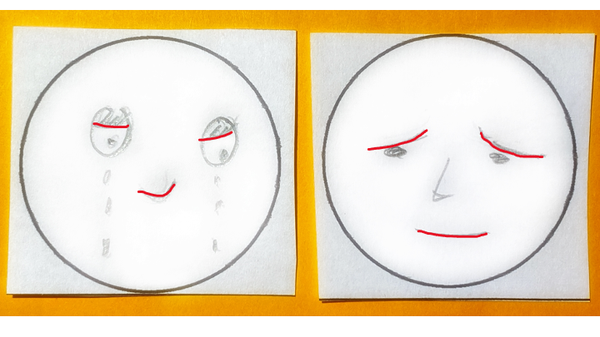
Figure 7. The same drawings as in Figure 6 with the upward curved lines highlighted.Some tasks that are easy for humans are not easy to get a computer to do using classical computer programing.
What are some examples of things you've experienced that might use machine learning?Listen to the students' responses. Some examples are:- Automatically tagging people in your photos on social media or grouping pictures with a specific person together.
- Ads you see on social media or YouTube are the result of an AI program. The data comes from data gathered as you and other users interact with the app or program. It uses all the collected data to provide personalized advertisements that it believes match your interests, style, etc.
- Movie or music recommendations are done by AI programs. The program makes recommendations based on initial information you provide (like your age) and then "learns" from your and other viewers' history.
- Detecting spam in your emails is also done by an AI program. Spammers try to outsmart it, and the program adjusts as the environment changes.
- Auto filling what you are typing.
- Self-driving cars
- Chatbots
- Speech recognition
- Screening for disease in medical images
- Navigation systems
- Smart assistants like Siri and Alexa
Write the students' answers down on the whiteboard or a piece of paper. The class will come back to these examples later in the lesson.
Watch the video Machine Learning and Human Bias until timestamp 1:52.
After watching the video, allow students to briefly discuss in their groups if they think their machine will be biased, and if so, what bias they expect.
Have students complete questions 7 and 8 on their worksheets.
- Let us see how well our machines learned to classify happy and sad faces!
Test with learning data
(slide 11-12).
Our machines are now trained to classify happy and sad faces. Do you think our machines will always classify the drawings they learned from correctly? By a show of hands, how many believe it will?
Testing using the webcam is easy and fast. Hold a drawing in front of the camera and the bars below will show how the machine classifies the drawing. If the device does not have a camera, upload pictures instead.
Ask students to show their machine a drawing from their learning data.
How does the machine tell you which class it thinks this drawing belongs in?Guide the students towards the probability bars in the output section. These display how confident the model is of its classification.Figure 8 shows three examples. The machine classifies the picture on the left with 97% certainty in the "Happy" class and classifies the middle picture with 99% certainty in the "Sad" class. The results are not always this clear. For example, the machine is unclear where to classify the picture on the right; it classifies it with 52% certainty in the "Happy" class and 48% certainty with the "Sad" class.
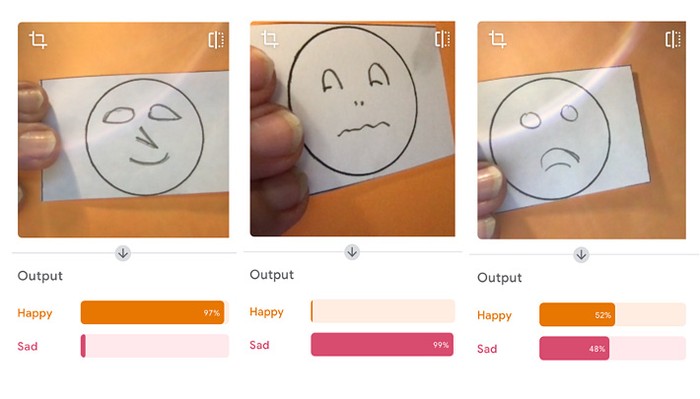
Three output screens for a machine learning model that learned to classify sad and happy drawings. The first picture shows a happy face; under this picture, the bar next to 'Happy' is almost fully highlighted. The second picture is a sad face; under this picture, the bar next to 'sad' is almost completely highlighted. The last example shows a sad face, the bars next to 'Happy' and 'Sad' are both about halfway highlighted.
Figure 8. Bars indicated how certain the machine is of its classification.Ask the students to complete steps 9 and 10 of their worksheet. These steps guide students through testing their machines on their learning data and improving the machines if needed.
The Teachable Machine Tutorial 3 can help you troubleshoot this step.
-
Improve learning data
(slide 13).
If students use the webcam to test the machine, the machine might not show the same level of confidence when presented with samples of the learning data – the slight variations in how you hold the drawing in front of the webcam can lead to misclassifications. Some groups will likely see a bias when presenting the machine with pictures held closer to or further from the lens. For example, the model trained with the data presented in Figure 5 tended to classify drawings held slightly further away from the camera as "Happy" and weigh drawings held close to the lens more heavily toward "Sad" (see Figure 9).
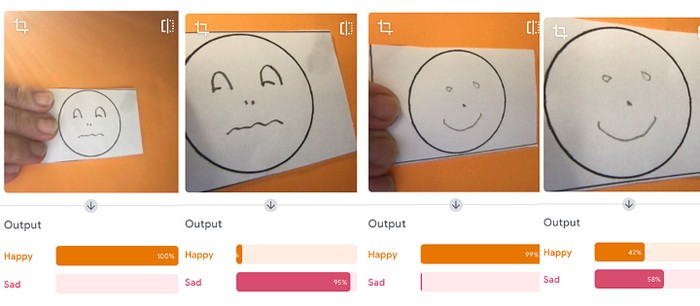
Figure 9. Holding the training images at different distances from the camera can affect the results.Ask students who see this type of positional bias how they can resolve the issue. In the Science Buddies test case, adding a picture taken further away and one close to the camera in both classes was enough to remove the bias. Figure 10 shows the new learning data. Remember to retrain the model after each change in the learning data.
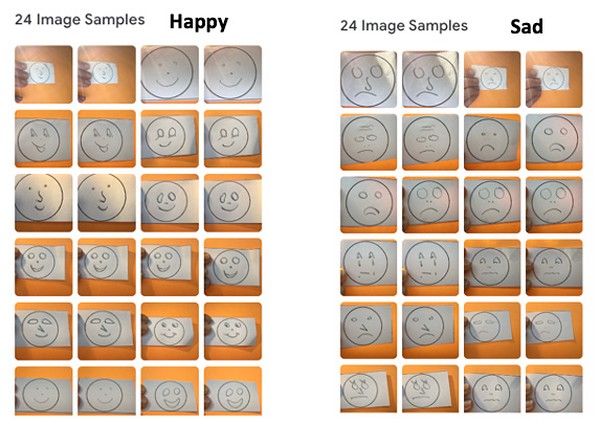
Figure 10. Updated learning data.Groups that are done early can pick up a new template and draw more happy and sad faces. This time, they should use markers, crayons, or coloring pencils. Guide them to add details, color the face or the background, or change the drawings in any other way.
-
Test with new data
(slide 14).
Once most groups have finished steps 9 and 10 of the worksheet, re-distribute the drawings students used to train their machines so that all groups have happy and sad faces from several other groups.
The real test for our machine is seeing if it can classify drawings it has never seen before, drawings that are not part of the learning data. Do you think it will be easy for your machine? By a show of hands, how many believe their machine will be correct most of the time?Ask the students to test their machine on the new data (step 11 of their worksheet). Students should collect their results in a table. Studying the completed table may help students notice any bias their machine has.
Does the machine show a tendency to misclassify some situations as "Sad" or "Happy"? Do you see any systematic mistake or bias in your machine? - Test in unfamiliar situations (slide 16).
Next, students will extend their test data to situations not covered in the learning data. Some examples include:
- drawings made with markers, pens, crayons
- faces drawn in detail
- colored backgrounds
- only the drawing held before the lens; no solid color background
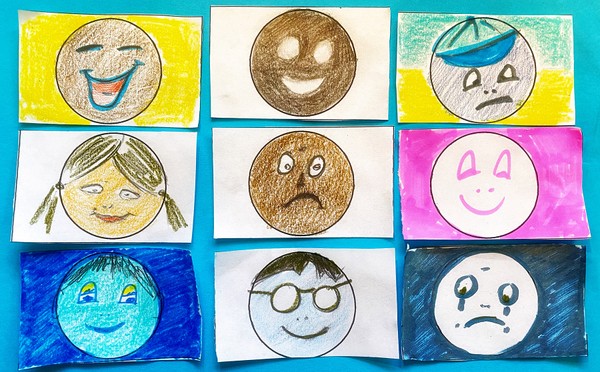
Figure 11. Examples of unfamiliar test drawings.How well does the machine do in these situations? Does it show a tendency to misclassify some new situations as "Sad" or "Happy"? Do you see any systematic mistake or bias in your machine?
/-/https/www.sciencebuddies.org/Files/18129/6/teachable-machine-opening-page.png)
/-/https/www.sciencebuddies.org/Files/18130/6/learning-data-example-teachable-machine.jpg)
/-/https/www.sciencebuddies.org/Files/18131/6/teachable-machine-training-data-happy-sad.jpg)
/-/https/www.sciencebuddies.org/Files/18132/6/sad-faces-with-curved-up-lines.jpg)
/-/https/www.sciencebuddies.org/Files/18133/8/sad-faces-upward-curved-lines-accentuated.png)
/-/https/www.sciencebuddies.org/Files/18134/6/examples-certainty-bar-teachable-machine-.jpg)
/-/https/www.sciencebuddies.org/Files/18135/6/examples-bias-teachable-machine.jpg)
/-/https/www.sciencebuddies.org/Files/18136/6/updated-learning-data.jpg)
/-/https/www.sciencebuddies.org/Files/18137/11/faces-for-extended-test-of-machine-learning.jpg)
Reflect (15 minutes and an optional 60-minute extension activity)
- Allow students to work on questions 13 and 14 of their worksheet, in groups or individually.
- Gather the class and reflect on the experiences the class had.
Was your machine able to classify drawings it had never seen?What were some things the machine could do easily, and what are some of the difficulties you encountered?Did the machine show the bias you had predicted? Did the machine show bias you did not expect?What makes creating an unbiased machine hard?Discuss students' findings. The students' experiences will probably illustrate that machine learning is a powerful tool, but also a tool that is susceptible to bias.
-
Reflect on opportunities and dangers in AI
(slides 17 - 20)
Our machine was made to classify drawings as happy or sad faces, but there is a whole field in computer science that develops tools that can capture and analyze human emotions called emotion AI. This can be emotions expressed by people in writing, spoken during a phone-call or during an in-person conversation, in a photo, or in a video (slide 17).
Where could emotion AI be useful? (slide 18)Listen to the students' ideas. Some examples are listed below.- Recognize when a person who is driving is upset and advise them to pull over.
- Automatically detect if students are feeling confused about a lesson being taught to them.
- See what feelings an advertisement or a speech evoke in people.
What could be some unintended consequences of such a tool, or what could be the impact of systematically misclassifying some people or expressions?Listen to the student's ideas.- If insurance companies know you are driving when upset, they might raise your insurance premiums.
- It raises questions of privacy.
- It might not work as well with people of different cultures.
Another example of AI is facial recognition (slide 20). Whereas emotion AI tries to detect emotions like happy/sad, regardless of the person, facial recognition tries to recognize a specific person, regardless of their emotion/expression. Facial recognition (slide 21) can make the data and devices more secure but may carry racial bias and cause concern about surveillance and potential privacy violations.
If time allows, go back to the list of applications students made (see step 8). For each example, ask students to list some benefits, and some dangers.
- Optional: AI invention project (slides 21-26).
This is an optional creative project that will help students integrate what they learned.
- Remind students that new technology and innovation can bring solutions. Give the smart robots example listed in the slides (slide 22) or remind students of the examples they provided in step 3 of the reflection.
- Challenge each group to imagine a facial recognition or emotion AI driven solution to a problem. It is ok to use an existing AI solution or one that is under development. To find inspiration, students can look up examples of current facial recognition and emotion AI applications.
- Once students have some time to gather ideas, gather the class and remind students that new technology and innovation often comes with unintended consequences. Give the smart robots example (slide 24) or remind students of the examples that came up in step 3 of the reflection.
- Challenge the groups to imagine what unintended consequences their AI invention might have. Encourage students to find articles that explore the challenges of facial recognition and emotion AI technologies. The article Racial Discrimination in Face Recognition Technology from Harvard or video Gender Shades from MIT media lab can get them started.
- Ask each group to use storytelling to demonstrate their invention to their peers. The demonstration should include answers to the following questions.
- What is the invention?
- What problem does it solve?
- How will it interact with the world?
- How will it help people?
- What are some potential unexpected consequences, misuses, or dangers to society?
- Let groups share their AI invention with the rest of the class.
Assess
The creative project of the AI invention can be used to asses the students' understanding.
You can also use the student's worksheet to assess student learning.
Make Career Connections
Discussing or reading about these careers can help students make important connections between the in-class lesson and STEM job opportunities in the real world.
/-/https/careerdiscovery.sciencebuddies.org/Files/1163/18/pexels-photo-1181472.jpg)

/-/https/careerdiscovery.sciencebuddies.org/Files/1011/20/pexels-photo-7375.jpg)
Lesson Plan Variations
- This lesson classifies simple drawings. Other classes can be created instead like having the machine recognize two stuffed animals, when a person is waving to the computer or just looking at the computer, when one or several persons are visible in the screen, classify sounds as a clap, a bell, or background noise, recognize students' faces, etc.
- For students with computer programming experience, let them export their program and explore implementing the trained model in an application they create.
- In the optional part of this lesson you can give students the freedom to invent AI in any area instead of just focusing on emotion AI and facial recognition. Some examples are:
- Use video and sound to pretend you are a different person.
- Object recognition; its benefits and problems.
- Drives anywhere by itself (self-driving car).
- A buddy that follows you around and carries your cargo.
- 3D printed robot dog that can learn like a real dog!
- AI combined with 3D printing could create autonomous object creation.
- Smart robots that can perform jobs where strength, endurance, and problem solving are needed.
/-/https/img.youtube.com/vi/eXAQenQKkzc/0.jpg)
/-/https/img.youtube.com/vi/KMzc3NE9FcI/0.jpg)
/-/https/img.youtube.com/vi/y7v1xHn3Vmw/0.jpg)