/-/https/www.sciencebuddies.org/cdn/Files/21464/5/sb-logo.png)
/-/https/www.sciencebuddies.org/cdn/Files/21464/5/sb-logo.png)
Patterns of the Moon
Summary
/-/https/www.sciencebuddies.org/cdn/Files/18749/10/tech-interactive.png)
/-/https/www.sciencebuddies.org/cdn/Files/20551/4/PatternsoftheMoon-Images-07.png)
Overview
Computational thinking is a problem-solving process that is used in everyday life as well as in computer programs. In this lesson, students apply their computational thinking skills to understand the patterns of the moon. Students will use past data patterns to predict a new month's moon cycle. They will then use these patterns to modify a Scratch program and showcase their learning.
Learning Objectives
Students will:
- Analyze the moon cycle of a previous month.
- Use the data patterns to predict the current month's cycle.
- Apply conditionals to an algorithm.
- Modify a Scratch program to demonstrate the current moon cycle.
NGSS Alignment
- 5 5-ESS1-2: Represent data in graphical displays to reveal patterns of daily changes in length and direction of shadows, day and night, and the seasonal appearance of some stars in the night sky.
- Disciplinary Core Ideas: 3.PS2.A
- Science and Engineering Practices: Analyzing and Interpreting Data
- Crosscutting Concepts: Patterns
- 3-5 DA.9: Use data to highlight and/or propose relationships, predict outcomes, or communicate ideas. (P7.1)
- 3-5 AP.12: Create [or modify] programs that include events, loops, and conditionals. (P5.2)
Teacher Tool Box
- PDF of this Lesson
- Patterns of the Moon Observation Calendar
- Patterns of the Moon Flowchart Template
- The Tech Interactive Scratch Program: Patterns of the Moon
- Optional: Computational Thinking Elements posters
- Patterns of the Moon Video for Educators, Essentials (12:08 min)
- Patterns of the Moon Video for Educators, Extensions (5:35 min)
Materials
- Writing utensils (pencils, markers, etc.) (2-3 per pair)
- Moon Phase Observation Calendar: Choose one of the following for your class:
- Blank: Have students observe the moon themselves and complete the handout in the month before the lesson.
- Pre-Filled: Provide a sample completed calendar of phases. You can use this moon phase generator from "Moon Calendar," Calendar-365 website, to select the month in which you are interested.
- Tech Interactive "Patterns of the Moon," Scratch website
- Devices for students to do pair programming on Scratch
- Flowchart Template
- Optional: Computational Thinking Elements posters (English and Spanish)
Educator Resources
Videos of Programming Patterns of the Moon on Scratch:- Essentials (12:08 min)
- Extensions (5:35 min)
Background Information for Teachers
Moon Phases
Students should understand basic facts about the moon, such as:
- The moon orbits the Earth.
- Depending on the time of year, month, and/or day, the moon has different positions.
- There are eight phases of the moon and the pattern of those phases is the same every cycle.
- The reason we see the moon "light up" is because it's reflecting the sun.
- Phases of the moon are the same everywhere in the world.
Check out "Top Moon Questions Inside and Out," National Aeronautics and Space Administration (NASA) website, for more information.
/-/https/www.sciencebuddies.org/cdn/Files/20555/10/moon-orbit.png)
A diagram showing the moon in each position around Earth, including the position of the Sun and the corresponding moon phase. Phases include New Moon (between the Earth and Sun), and then moving clockwise: Waning Crescent, Last Quarter, Waning Gibbous, Full Mon, Waxing Gibbous, First Quarter, and Waxing Crescent.
Computational Thinking
Computational thinking is a problem-solving process that is used in everyday life as well as in computer programs. This activity focuses on the computational thinking elements of pattern recognition and algorithms, cornerstones of computer modeling.
Real-world examples of patterns:
- Playing games like UNO
- Schedules, e.g., you might play a sport that only happens during a specific season
- Music, e.g., songs usually follow a pattern or they have a chorus that repeats
Algorithm: Step-by-step instructions to solve a problem. When solving a problem, it is important to create a plan for your solution.
Real-world examples of algorithms:
- Recipes
- Instructions for making furniture
- Plays in sports
- Directions for building block sets
- Directions to a place on a map
Recognizing patterns is critical when looking at the phases of the moon. If students understand the pattern that the phases follow, they can determine and eventually predict when the next phase will happen using an algorithm. Although students might be able to predict when the next full moon will happen, astronomers have turned to computer science to write algorithms based on the observed patterns. This is why we can select a specific date in the near or far future and know what phase the moon will be in.
Change over time
- This lesson pairs well with cycle investigations and concepts that have the underlying idea of change over time. For Example: weathering cycle, movement of matter in the ecosystem, energy cycles, timelines in social science, technology, etc.
- As needed, adjust the lesson to visualize change over time in a different content area.
- See Butterfly Algorithms for a K-2 example of an adaptation focused on the life cycle.
Academic vocabulary
This lesson is full of academic vocabulary including computer science terminology. One strategy we recommend is frontloading the vocabulary to boost language acquisition. See the Background Information for the vocabulary and concepts that are used throughout the lesson.Vocabulary
- Algorithm: Step by step instructions to solve a problem.
- Code: Set of written commands that a computer follows when executed.
- Computational thinking: A way to solve problems that uses logic and thinking that a computer can understand. We use these same ways of solving problems in our everyday life, too. Computational Thinking includes algorithms, patterns, decomposition, and abstraction.
- Computer program: A set of instructions to tell a computer what to do.
- Computer scientist: A person who studies or creates computer programs.
- Conditional: Something that needs to happen in order for something else to happen.
- Event: An action that needs to happen for the code to run.
- Flowchart: A diagram that shows what a computer program looks like.
- Loop: A set of instructions that will happen over and over for a set amount of times.
- Operator: Arithmetic blocks that have mathematical operations (+, x, -, etc.) and logical operators (and, or, not).
- Pattern recognition: Recognizing if there is a pattern and determining the sequence.
- Phase: A distinct part or step in a process.
- Pseudocode: Steps written in plain language with some programming terminology that describes what your program does.
- Sequence: The order in which the code will happen.
- Variable: A value that can change depending on what is happening.
Resources and References
- Computational Thinking Tech Tip, The Tech Interactive
- Computer Programming Tech Tip, The Tech Interactive
- Getting Started Tutorial on Scratch
- Educator resources on Scratch
For more lesson plans, videos and other facilitation resources see thetech.org/resources.
Prep Work
Lesson Preparation
- Students will need a Moon Phase Observation Calendar for this lesson. There are a few options for this:
/-/https/www.sciencebuddies.org/cdn/Files/20554/9/PatternsoftheMoon-PhaseObsvCalendar.png)
- Option 1: Have students record their own observations using the Blank Moon Phase Observation Calendar at least one month before doing the lesson.
- Option 2: Use a moon phase generator from "Moon Calendar" to make sure that all students have a completed and correct moon phase calendar for the month you are exploring.
Note: Students can draw what the moon looks like. They will need to note the names and dates of the eight phases that will be used in the Scratch program, but it is not necessary to include visibility for every day.
- Optional: Hang up The Tech's Computational Thinking Pattern Recognition and Algorithm Posters (English and Spanish).
- Review the Plugged Design Challenge and watch the educator resource videos introducing the programming concepts in Scratch.
- If you and your students are unfamiliar with Scratch, practice doing the activity "Patterns of the Moon" before students modify the Scratch program for the updated month.
- Review and plan for extensions as needed.
Lesson Instructions
| (Optional) Moon Phase Observation | During the month prior to the lesson, students observe and record what the moon looks like every night. |
|---|
| Session 1: Unplugged Activity | 45 min |
|---|---|
| Students will use computational thinking to recognize patterns in the phases of the moon. They will create a flowchart representing this cycle for a specific month. | |
| Session 2: Plugged Design Challenge | 90 min |
| Students will modify a computer program using the flowchart they created. | |
Session One: Unplugged Activity
| Frame the Activity | 10 min total |
|---|---|
| Activate Prior Knowledge | 5 min |
| Introduce Computational Thinking | 5 min |
| Unplugged Activity | 35 min total |
| Moon Phase Calendar Check-in | 5 min |
| Finding Patterns | 10 min |
| Computational Thinking and Programming Concepts | 15 min |
| Debrief | 5 min |
Frame the Activity
Activate Prior Knowledge (5 min)
- Lead a discussion to help students access prior knowledge about moon phases and patterns. Ask Guiding Questions such as:
- What can you tell me about how the moon looks?
- What kind of patterns does the moon have?
- How long does it take for the pattern to repeat?
- Where else do you see natural patterns on Earth?
- During the discussion, encourage students to share personal observations or experiences they have had looking at the moon.
- Students may make observations about the shape of the moon, seasons, night and day, and the connection between high and low tides and the moon.
- Briefly introduce the design scenario: You are applying for a computer programming position at NASA Ames. Before they can hire you, they want you to complete a performance task: identify the pattern of how often the moon changes phases based on data, and then create a simple moon phase program showing all phases of the moon for the current month.
Introduce Computational Thinking (5 min)
- Ask students if they have heard of computational thinking: When I say computational thinking, what does that make you think of? What words do you recognize in computational thinking? You may have noticed the words "computer" and "thinking," how does a computer think?
- Write down keywords or draw ideas used to describe computational thinking.
- There will be a variety of answers and ideas. Lead students to the following understanding:
- Computational thinking is a way to solve problems that uses logic and thinking that a computer can understand. We use these same ways of solving problems in our everyday life, too.
- Explain to students that for this activity, they are going to focus on two computational thinking elements: pattern recognition and algorithms.
- Share the definitions and the real-world examples so that they can see how they already use these skills every day. (See the Background Information)
- It may be useful to post these definitions and examples up on the board.
- Option: If you have The Tech Interactive's Computational Thinking Pattern Recognition and Algorthim posters up, refer to them at this time.
Unplugged Activity
Moon Phase Calendar Check-in (5 min)
- Place students in pairs and have them review the Moon Phase Observation Calendar.
- If you chose Option 1 and students made observations on their own, have them compare their chart with their partner.
- If you chose Option 2, give each pair two to three minutes to make any observations of the pre-filled moon phase calendar you provided.
Finding Patterns (10 min)
- The activity is outlined as a design problem, with desired features and limitations below. Explain it to students and address any questions they might have.
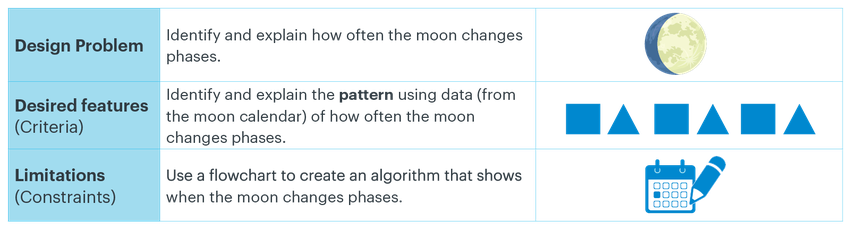
The design problem is to identify and explain how often the moon changes phases. The desired features or criteria are to identify and explain the pattern using data (from the moon calendar) of how often the moon changes phases. The limitations or constraints are to use a flowchart to create an algorithm that shows when the moon changes phases.
- Once they understand the challenge, students should discuss what they know about the moon and any patterns they have observed with their partner.
- Review the phases as needed with students.
- As they discuss, students should look for patterns in the Moon Phase Observation Calendar.
For Example: In this calendar for the month of June 2023, the moon phase on June 1, 2023 is Waxing Gibbous. Then, there is a Full Moon on June 3, 2023, followed by a Waning Gibbous on June 6, 2023.
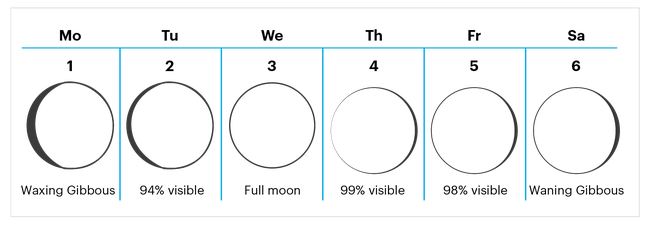
- Based on the first six days of June, it seems the moon is changing phases every three days.
- Once most pairs have identified a pattern, ask for a couple of volunteers to share their pattern and the reasons why they chose that pattern.
- Encourage students to use sentence frames when sharing:
- At the beginning of the month, the phase is _______, and after ____ days the moon phase changes to _______. The pattern continues because _______.
/-/https/www.sciencebuddies.org/cdn/Files/20560/4/PatternsoftheMoon-Images-06.png)
/-/https/www.sciencebuddies.org/cdn/Files/20561/4/PatternsoftheMoon-Images-05.png)
Computational Thinking and Programming Concepts (15 min)
- Next, tell students that now that they understand the pattern, they are going to use it to develop an algorithm (set of instructions for a computer).
- They are going to think like computer scientists and use the language and logic a computer would need to understand an algorithm (code).
- Refer back to the scenario and remind them that they are going to create a simple computer program (algorithm) that shows the phases of the moon for the current month, so they'll need to think about the pattern they use to organize the dates of the month.
- Tell students they are going to use two programming concepts called conditionals and operators in their program.
- Conditional statements are essential to any computer program. They allow for something to happen as a result of an action.
Example: If the "File" menu on a document is clicked, then a drop-down menu will appear. - Operators are mathematical symbols or logical statements that allow a rule to be followed.
- Conditional statements are essential to any computer program. They allow for something to happen as a result of an action.
- To help plan their program, tell students that they will create a flowchart. Define the term and explain that programmers sometimes use flowcharts to help them organize their algorithm and notice patterns.
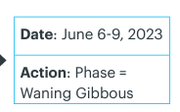
- Pass out and explain the Flowchart Template handout. Each rectangle represents the set of dates when the moon has a specific phase.
- Give pairs about 10 minutes to complete their flowchart based on the patterns they identified in their Moon Phase Calendar.
- If students finish early, have them find another pair and share their algorithms with each other.
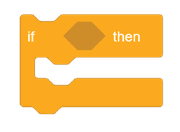
- Notice that there are nine Time/Action blocks and there are also nine conditional blocks ("if/then" blocks) in the Scratch file.
y
y
- Typically, flowcharts use different symbols to represent the program's progression.
Flowchart Template has been simplified so every rectangle represents the date and the phase the moon will be in. This will support students when they code.

y
/-/https/www.sciencebuddies.org/cdn/Files/20564/5/moonpage7.png)
/-/https/www.sciencebuddies.org/cdn/Files/20563/4/PatternsoftheMoon-Images-04.png)
/-/https/www.sciencebuddies.org/cdn/Files/20565/4/PatternsoftheMoon-Images-03.png)
Real-world Conditionals:
- If you finish your homework early, then you can play outside with the neighbor.
- If you eat your dinner, then you get dessert.
- If the weather is rainy, then you need an umbrella.
Operators: Arithmetic blocks that have math operations (x, + , -, etc.) and logical operators (and, or, not).
When are operators used in the real world?
- When you go grocery shopping and buy five boxes of the same cereal and instead of scanning each, the checkout person only scans one and multiplies it by however many you have.
- Think about the following statements and how they change based on logical operators:
- "You can have cake OR cookies." versus "You can have cake AND cookies."
- "We can go to the mall OR the movies." versus "We can go to the mall AND the movies."
If students need additional support writing their program, introduce them to this method that programmers sometimes use to explain to other humans what their program does.
Example:
- If Date of Month = 1, then switch to Waxing Gibbous
- If Date of Month > 2 and Date of Month < 6 then switch to Full Moon
- If Date of Month > 5 and Date of Month < 10 then switch to Waning Gibbous
- Continue using the pattern from above
Tips:
- Share the example and ask students if they see a pattern between steps.
- Note: Each step has an "if/then" statement, which includes a comparison of dates. The reason we use this is because it is more efficient to write the algorithm using greater than and less than signs instead of having all of the dates with equal signs.
- Program efficiency is also important because it reduces the completion time, and there is less room for errors or bugs.
- Encourage students to verbally practice the conditional phrases.
- Students should understand the meaning of greater than and less than. For example: > 3 and < 7 refers to the numbers 4-6
Debrief (5 min)
- Lead a short debrief with students that focuses on their use of computational thinking, specifically around patterns and algorithms.
- Help students make connections between the skills they used in this activity, the work of computer scientists, problem solving, and other processes in their daily life. Reinforce these real-world applications and build their ability to use computational thinking in any setting.
- Possible Debrief Questions include:
- What patterns did your group observe to determine when the moon would change phases?
- Where else have you used patterns in your life?
- To deepen the connection with computer science, additional Debrief Questions can include:
- How did you use computational thinking to solve this problem? (How did you think like a computer scientist?)
- Can you think of any other examples of "if/then" phrases you might use in your day-to-day life? E.g., If I finish my homework early, then I can play video games.
Note: Students will need to refer to their flowchart again during the Plugged Design Challenge in Session 2.
Educator Resources
The rest of this lesson will use the program "Patterns of the Moon" on the Scratch website.
Before doing this plugged challenge with your students, check these step-by-step video resources:
- Programming Moon Phases: Essentials (12:08 min)
- Programming Moon Phases: Extensions (5:35 min)
If you need more support, review:
- The Tech Interactive's Computer Programming Tech Tip
- Getting Started Tutorial on Scratch
- Educator resources on Scratch
/-/https/www.sciencebuddies.org/cdn/Files/20566/4/PatternsoftheMoon-Images-02.png)
These are the names and functions of the blocks you will be using to code this program: Variable (Date of Month): Variables store information and keep count of something. In this case, it's keeping count of the date of the month. Operators: Arithmetic blocks that have mathematical operations and logical operators (and, or, not). If/Then Conditional: Logic control blocks that are commonly used in programming languages. This block is used to check the validity of a condition. If the condition is true, then it will do something. Switch Costume: Looks blocks allow the Sprite to look a certain way and can be customized. In this case, we are changing the Sprite to be an image of one of the phases of the moon.
Session Two: Plugged Design Challenge
| Plugged Design Challenge | 90 min total |
|---|---|
| Introduce the Plugged Challenge | 5 min |
| Model on Scratch | 10 min |
| Programming | 30 min |
| Programming Concepts | 15 min |
| Sharing | 20 min |
| Debrief | 5 min |
Introduce the Plugged Challenge (5 min)
- Revisit the design scenario. Explain that now that they used computational thinking, students will be creating a computer model.
You are applying for a computer programming position at NASA Ames. Before they can hire you, they want you to complete a performance task: identify the pattern of how often the moon changes phases based on data and then create a simple moon phase program showing all phases of the moon for the current month. - Share the updated design problem, desired features, and limitations. Address any questions students have.
/-/https/www.sciencebuddies.org/cdn/Files/20567/4/PatternsoftheMoon-Images-01.png)
The new design problem is to Use the determined pattern to create a simple moon phase program of the current month. The first desired features or criteria are the same as previously: Identify and explain the pattern of how often the moon changes phases using data. The second desired feature is new: to use conditionals and operators to show when the moon changes phases. The third new desired feature is to test the computer model until it runs the algorithm successfully. The new limitations or constraints are: to write your algorithm in the block language on Scratch, and there's a time limit!
Model on Scratch (10 min)
- Run the program "Patterns of the Moon" by clicking the green flag, then the space bar, and advancing through the days of the month on the slider bar.

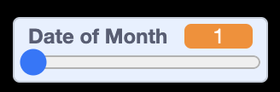
- Ask students:
- What did you notice about the computer program?
Note: Did the phases and dates correspond to the month we are looking at?- Students should realize that the program is programmed for June 2023.
- Click "See inside" to show students the code behind the program.
- Click on the "Moon Phase" sprite.
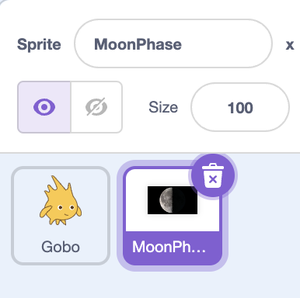
- Focus on the "If/Then" conditionals in the code.
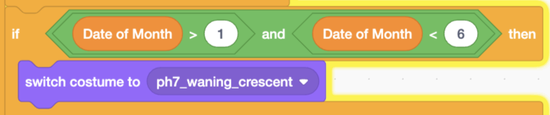
- Ask students to read one or two conditional and operator blocks:
- "If the date of the month is greater than two, and the date of the month is less than four, then switch costume to full moon."
- Where have you seen these words or symbols before?
- Students should realize that their flowchart is almost identical to the Scratch blocks.
- Ask: What dates is this conditional block referring to?
- Students should notice that the conditional block is for June 3rd.
- Ask students to explain how they could alter the conditional, operator, and Sprite costume to show a different time or phase of the moon.
- Have a volunteer give an example from their own flowchart.
- Show students how to test the program to ensure that it works as expected.
- Click the green flag, then press the space bar, and drag the slider bar to see if the images change for each phase.
/-/https/www.sciencebuddies.org/cdn/Files/20569/4/go-stop.jpg)
/-/https/www.sciencebuddies.org/cdn/Files/20568/4/date-of-the-month.png)
/-/https/www.sciencebuddies.org/cdn/Files/20570/4/see-inside.jpg)
/-/https/www.sciencebuddies.org/cdn/Files/20571/4/scratch-moonphase.png)
/-/https/www.sciencebuddies.org/cdn/Files/20572/4/if_then.png)
- Encourage students to review and read the blocks aloud in complete sentences and determine what dates the code is referring to. This allows students to practice both reading code and understanding number comparisons.
- Example: "If the date of the month is greater than one" means that the date would be after June 2nd.
Programming (30 min)
- Have students get in pairs to share one computer and open "Patterns of the Moon."
- Students should click on the button and the MoonPhase Sprite and begin modifying the code to match the phases of the moon to the month that is being studied.
- Note: Students are essentially changing the numbers to match the dates of the month and changing the costume block to match the correct phase.
- Encourage students to use their Flowchart (and their pseudocode if they created one).
- Remind students to continue to find and use patterns as they code.
- Encourage students to test often to ensure that their algorithm (code) is doing exactly what they expected. If not, students should engage in debugging their code to find what needs to be fixed.
Programming Concepts (15 min)
- Help students make connections between the skills they used in this activity and those of computer scientists. Encourage students to share what they remember about the programming concepts used, including conditionals and operators.
- Have students explain how conditionals work by asking questions like:
- What would happen if we changed the month?
- Why is it that only certain numbers (dates) change the phase?
- Students should understand that conditionals check if something is true or not, so that's why certain numbers are attached to a phase.
- To deepen understanding of the code, ask:
- Why do you think we need the "forever" block?
- This is an example of a loop.
- The forever block allows the user to go back and forth and see the different phases of the moon instead of only seeing them once. Try removing it and see what happens!
- What would happen if the operators were switched? How would the code change?
- Depending on which operator they use, the code could change drastically.
- Example: If they decided to use the = instead of < or >, then their code would be extremely long. The < and > provide some elegance and efficiency for the program.
- Are there other ways you can write the same code?
- There is always more than one way to write the code. If students are feeling up to the challenge, have them try it out.
- Why do you think we need the "forever" block?
Share Solutions (20 min)
- Have students share their completed programs with each other
- Remind them of the design scenario and let them know they will now share what they created with the NASA interview team.
- Their goal is to make sure they have created a simple moon phase program showing all phases of the moon for the current month.
- Have each pair take turns sharing their program with another team.
- Option: If you have more time, have each team present to the class.
- The presenting team should respond to any questions or comments from the audience.
| Presenting Team | NASA Interview Team (audience) |
|---|---|
| Run the program. | Notice what is happening with the program. |
|
|
|
|
If you want to focus on more of the programming concepts that are present in the program, you might have students explore and identify the following:
- Sequencing
- Events
- Variables
Debrief (10 min)
- Lead a short debrief with students which focuses on programming, patterns, algorithms, operators, and conditionals.
- Possible Debrief Questions include:
- What patterns helped you write your code?
- How were number comparisons used in your code?
- How well did your algorithm work?
- What programming concepts did you use today?
- What did you find interesting about the process? What did you find challenging?
- Tinker: Have students add text or sounds to the program as well so that they appear when the slider is moved. They can have this text and audio give facts about the content.
- Sea Level Rise: Have students apply this process to adjust the program to another change over time concept. Images from "Sea Level Rise and Coastal Flooding Impacts," National Oceanic and Atmospheric Administration (NOAA) website, of the San Francisco International Airport, starting with the year 2018 in ten-year increments, show the effect that sea level rise is having on SFO.
Optional Resources
- See the Extensions video (6:08 min) for detailed directions.
- Check out these Scratch tutorials for tips as well
- Use the following Scratch Coding Cards with students for additional support:
- Say something
- Change costumes
- Change backdrops
- Add a sound
/-/https/img.youtube.com/vi/s13ESfc4KYg/0.jpg)
/-/https/img.youtube.com/vi/U7XYzPfutBs/0.jpg)
/-/https/img.youtube.com/vi/WJ06mrNliC0/0.jpg)