/-/https/www.sciencebuddies.org/Files/21464/5/sb-logo.png)
/-/https/www.sciencebuddies.org/Files/21464/5/sb-logo.png)
Push Harder — Newton's Second Law
Summary
/-/https/www.sciencebuddies.org/Files/11929/15/smartphone-car-acceleration-thumbnail.jpg)
/-/https/www.sciencebuddies.org/Files/11930/15/smartphone-car-acceleration.jpg)
Overview
Don't just teach your students about Newton's laws of motion using diagrams in a textbook—try something hands-on! In this project, students will build their own cars using craft materials and explore the relationship between force, mass, and acceleration. Students can graph data and make observations in real-time using a mobile phone and a sensor app or use a low-tech approach with a meter stick and stopwatch.Learning Objectives
- Understand the relationship between force, mass, and acceleration as described by Newton's second law of motion.
NGSS Alignment
This lesson helps students prepare for these Next Generation Science Standards Performance Expectations:- MS-PS2-2. Plan an investigation to provide evidence that the change in an object’s motion depends on the sum of the forces on the object and the mass of the object.
|
Science & Engineering Practices
Planning and Carrying Out Investigations. Plan an investigation individually and collaboratively, and in the design: identify independent and dependent variables and controls, what tools are needed to do the gathering, how measurements will be recorded, and how many data are needed to support a claim.
|
Disciplinary Core Ideas
PS2.A: Forces and Motion. The motion of an object is determined by the sum of the forces acting on it; if the total force on the object is not zero, its motion will change. The greater the mass of the object, the greater the force needed to achieve the same change in motion. For any given object, a larger force causes a larger change in motion.
|
Crosscutting Concepts
Patterns. Graphs, charts, and images can be used to identify patterns in data.
|
Materials
/-/https/www.sciencebuddies.org/Files/7041/7/balloon-car-materials.jpg)
Assorted craft materials for students to build cars:
- Frame/body parts (plastic bottles, corrugated cardboard, popsicle sticks, etc.)
- Round objects to use as wheels (CDs, bottle caps, empty tape rolls, etc.)
- Items to make axles (e.g. a wooden skewer inserted through a straw, or a pencil inserted through a rolled tube of paper)
- Other classroom/office supplies (paper clips, binder clips, zip ties, rubber bands, etc.)
- Tape/glue
- Scissors
- Optional: hobby knives (useful for poking holes in bottle caps to make wheels, adult supervision recommended)
Materials to measure the cars' motion. Which materials you need depends on how you want to do the lesson. See the Explore section for an explanation of the different options.
- Smartphone with a sensor app such as phyphox, available for free on Google Play for Android devices (version 4.0 or newer) or from the App Store for iOS devices (iOS 9.0 or newer). Used to measure the car's acceleration.
- Optional (if you do not want to use a sensor app): tape measure or meter stick and stopwatch. Used to measure total distance the car travels and calculate average velocity.
Background Information for Teachers
This section contains a quick review for teachers of the science and concepts covered in this lesson.Newton's second law of motion states that the net force on an object is equal to the object's mass times its acceleration. In equation form
Equation 1:
- F is the net force in newtons (N)
- m is the mass in kilograms (kg)
- a is the acceleration in meters per second squared (m/s2)
This equation shows, mathematically, what will happen if you change one of the variables. For example, if you double the force on an object and its mass stays constant, its acceleration will also double (Figure 1). If you keep the force constant and double an object's mass, its acceleration will decrease by half.
/-/https/www.sciencebuddies.org/Files/11931/6/force-mass-acceleration.png)
Figure 1. If you increase the net force acting on an object (blue arrow) and its mass remains constant, then its acceleration will also increase (black arrow).
In this lesson plan, your students will build and push their own toy cars, then gather experimental data to understand how changing the force on an object while keeping its mass constant affects its acceleration. This will allow them to see the relationship without needing to understand algebra and Equation 1. However, to do this experimentally, we need a way to measure acceleration. Acceleration is defined as the rate of change of an object's velocity:
Equation 2:
- a is the acceleration in meters per second squared (m/s2)
- Δv is the change in velocity in meters per second (m/s)
- Δt is the change in time in seconds (s)
So how could you measure acceleration, for example, when pushing a toy car across the floor? You would need to know the car's velocity at two different points, and the time it takes it to travel between those points. This is a little easier if the car starts from resting (so you know the initial velocity is zero), and you measure the velocity after you push the car. You also need to measure the time it takes the car to travel from its starting position to the point where you measure its velocity (Figure 2). Then, you can calculate the car's acceleration using Equation 2.
/-/https/www.sciencebuddies.org/Files/11932/6/car-acceleration-diagram.png)
Figure 2. Measurements you need to take to calculate the car's acceleration.
In theory, you could take these measurements using a meter stick and a stopwatch, but in practice this can be difficult to do because our reaction time introduces measurement error. Another approach is to measure acceleration directly using an accelerometer. Accelerometers are electronic sensors that are used in many modern electronic devices, like smartphones and video game controllers, to measure motion. Specific sensor apps allow you to easily record data from an accelerometer on your phone. You can mount a phone equipped with the app to a car, and record acceleration when you push the car. Figure 3 shows data recorded for light, medium, and hard pushes while keeping the car's mass constant.
/-/https/www.sciencebuddies.org/Files/11933/14/car-acceleration-graphs.png)
A graph that measures the acceleration of a car being pushed with varying forces has three lines colored red, blue and green. The three plots follow a similar pattern of increasing drastically in the beginning and then decreasing drastically before leveling off. The red line on the graph represents a car being pushed forward with the largest force and has the largest spike in acceleration. The green line on the graph represents a car being pushed with a medium force and has the second highest spike in acceleration. The blue line on the graph represents the car being pushed with the smallest force and has the lowest spike in acceleration.
Figure 3. Data recorded using a sensor app on a phone mounted to a toy car. Note that the data is somewhat "noisy" instead of smooth. This is normal, as the car's motion may not be completely smooth, and the app has a limited sampling rate (the number of sensor readings it can take per second), resulting in the "spiky" appearance of the data.
In Figure 3, we can initially see a large positive acceleration when the car is pushed (its velocity rapidly increases). Then there is a small negative acceleration as friction gradually slows the car down to a stop (its velocity slowly decreases back to zero). If we graph the maximum acceleration vs. the strength of the force (Figure 4), then we can clearly see the relationship predicted by Equation 1 (if mass stays constant, then when force goes up, acceleration goes up). If you want to calculate the net force acting on the car, you can do so using Equation 1 (first you will need to measure the car's mass).
/-/https/www.sciencebuddies.org/Files/11934/15/acceleration-vs-force-graph.png)
Figure 4. The maximum accelerations from Figure 3 plotted against force strength.
Additional Background Links
- Acceleration, The Physics Classroom
- Newton's Second Law, The Physics Classroom
Prep Work (15 minutes)
- Organize your materials into separate bins (wheels, axles, bodies, etc.) so your students can search for parts easily when building their cards.
- If you are using bottle caps for wheels and are not comfortable with your students using hobby knives, poke small holes in the centers as part of your prep.
- If necessary, rearrange the desks in your room so the students have corridors of open floor space to push their cars. You can also do the activity in a hallway or large room (gym, cafeteria, etc.).
- Make sure you are familiar with the sensor app you are using before you show it to your students. The best way to do this is to play with the app on your phone to get comfortable enough using it to explain it to your students. Ideally, you want to test the experiment yourself with the app before class to make sure it works as intended.
Teacher Tool Box
Engage (5 minutes)
Note: this lesson assumes your students have already been introduced to the terms force, mass, acceleration, and velocity. If so, you can jump right into introducing your students to the sensor app.
- Walk your class through a demonstration using the sensor and introduce them to the accelerometer. When using the phyphox app, choose the "accelerometer with g" function.
- Tap on the accelerometer y graph to enlarge it and put the phone flat on a table, with the screen facing up. Press the play button and push the phone forward slightly (towards the "top" of the phone, this is the positive Y direction), then press the stop button to stop the recording.
 What do we see in the graph? Can you explain what you see?
 Your graph should look something like Figure 5. At first there is a large positive acceleration when you push the phone. This occurs because you exert a force on the phone by pushing it, and its velocity increases. Then, there is a negative acceleration as friction (the force between the phone and the surface of the table) slows the phone down. Note: if you push in the opposite direction—towards the bottom of the phone, in the negative Y direction—then the signs will be reversed and the graph will be flipped upside-down.
/-/https/www.sciencebuddies.org/Files/11935/14/accelerometer-pushing.png)
The graph shows the acceleration of a phone being pushed on a flat surface. The phone experiences a sharp increase in acceleration when pushed followed by a sharp decrease in acceleration as it stops before leveling out at 0. The maximum acceleration reaches about 10 and the minimum acceleration reaches about -8 meters per second squared.
Figure 5. Accelerometer data recorded when pushing the phone on a flat surface. The x-axis of the graph shows time in seconds [s] and the y-axis is acceleration in meters per second squared [m/s2].
- Now hold the phone flat in your hand, with the screen facing up. Press the play button to start a recording and slowly tilt the phone back and forth a few times in the Y direction, then stop your recording.
What do we see in the graph this time? Can you explain what you see?Your graph should look something like Figure 6. This may be confusing to your students at first because the phone was tilting, but not "moving" in the Y direction. This occurs because the accelerometer in the phone can also detect gravity, which points downward. For our experiment, we only want to detect motion in the horizontal direction, so it is important to keep the phone flat and parallel to the ground.
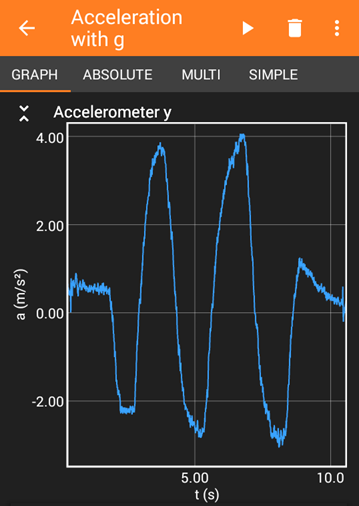
The graph shows the acceleration of a phone being tilted back and forth. Each time the phone is tilted there is a sharp increase or decrease in acceleration depending on the direction the phone is tilted. The maximum acceleration reaches bout 4, the minimum acceleration reaches about -3 meters per second squared.
Figure 6. Accelerometer data recorded while tilting the phone back and forth. The x-axis of the graph shows time in seconds [s] and the y-axis is acceleration in meters per second squared [m/s2].
/-/https/www.sciencebuddies.org/Files/11936/14/accelerometer-tilting.png)
Explore (60 minutes)
Note: the main procedure in this lesson assumes you will use a sensor app to measure acceleration directly, on a car that you push by hand. However, there are several other ways to do this lesson, depending on what topics you want to cover and whether you want to connect it to other lessons. See the Variations section for details.
- Give your students about half an hour to choose materials and build a car. Figure 7 shows an example. You may need to provide some guidance (e.g., demonstrate how to make a wheel/axle combination by pushing a wooden skewer through a straw, and poking the ends of the skewer through two bottle caps, as shown in the video before Figure 7). Students should make sure that:
- They can easily mount the phone to the car face-up so they can access the screen (e.g. using tape or rubber bands to secure it).
- The phone is parallel to the ground (this makes sure the accelerometer will only detect horizontal motion, and not gravity).
- The phone's long dimension (this is the "Y" accelerometer direction in phyphox) points in the direction the car will move.
- The car's motion is as smooth as possible. Make sure the wheels are centered on the axles and parallel to each other.
- They can repeatedly pick up, handle, and push the car without it falling apart (wheels falling off or becoming misaligned etc.). They should make any necessary adjustments to make their car sturdier.
/-/https/i.ytimg.com/vi/sOq8e6NvWKU/maxresdefault.jpg)
/-/https/www.sciencebuddies.org/Files/20511/4/google-classroom.png)
/-/https/www.sciencebuddies.org/Files/20512/4/ms-teams.png)
/-/https/www.sciencebuddies.org/Files/20469/4/Canvas_Bug_Color_RGB.png)
/-/https/www.sciencebuddies.org/Files/20470/5/Schoology-Logo.png)
/-/https/www.sciencebuddies.org/Files/20471/4/lms.png)
/-/https/www.sciencebuddies.org/Files/20469/4/Canvas_Bug_Color_RGB.png)
/-/https/www.sciencebuddies.org/Files/20470/5/Schoology-Logo.png)
/-/https/www.sciencebuddies.org/Files/20471/4/lms.png)
Figure 7. An example car. This car has a piece of corrugated cardboard for a body, straws and skewers for axles, and CDs for wheels.
- Now, have your students use their sensor app to
explore how the size of the force exerted on an object affects its acceleration.
- Mount the phone to the car. Make sure the phone is parallel to the ground, with the screen facing up.
- In the phyphox app, open the accelerometer with g sensor, select the Y accelerometer graph and press the play button.
- Give the car a "light" push (so it moves less than a meter).
- Stop and save the recording.
- Use the "pick data" function and select the maximum acceleration data point. Look at the maximum acceleration value. Record this value on the student worksheet.
- Repeat steps 2.b–2.e two more times, first with a "medium" push (so it moves a couple meters) and then a "hard" push (push the car as far as you can without crashing it into anything).
- Repeat steps 2.b–2.e two more times, for a total of three trials with each force. Try your best to be consistent with how hard you push the car.
- Optional, if you do not have access to a sensor app:
- Follow the procedure in step 2, but instead of using the sensor app, use a meter stick or tape measure to measure how far the car travels, from its starting position to where it comes to a complete stop. Use a stopwatch to measure the elapsed time from when the car is first pushed to when it comes to a complete stop.
- Calculate the car's average velocity using Equation 3:
Equation 3:
- vavg is the average velocity in meters per second (m/s)
- dtotal is the total distance traveled in meters (m)
- ttotal is the total elapsed time in seconds (s)
Important: remember that this is the average velocity over the entire distance traveled. The car's instantaneous velocity changes as it moves. The velocity starts out at zero, becomes positive as the car moves forward, then goes back to zero when the car comes to a stop.
- Teachers, you might be tempted to calculate the average acceleration as well. But remember that acceleration is defined as the rate of change of velocity or, change in velocity divided by change in time (Equation 2 in Background Information). The car's initial and final velocity are both zero—so the average acceleration is zero! How then, can your students use the information they have to compare accelerations between different trials? One way is to make an assumption about when the car's instantaneous velocity equals its average velocity, for example, half of the time from start to finish (ttotal/2). You know the car started from rest (its initial velocity was zero), so you can calculate the acceleration required to reach the average velocity in that amount of time using Equation 4.
Equation 4:
- a is the equivalent acceleration in meters per second squared (m/s2)
- vavg is the average velocity in meters per second (m/s)
- ttotal is the total elapsed time in seconds (s)
- Now you have an acceleration value for each of your trials and can proceed to the reflect section. Remember that this acceleration will not be equivalent to the maximum acceleration you would have recorded with the sensor app, but it will allow you to identify the same trend (as force increases, so does acceleration).
Reflect (10 minutes)
Students should use the worksheet to make a graph of their data, then discuss as a class./-/https/www.sciencebuddies.org/Files/14174/23/note-question-mark-30.png) | What trend do we see in our data?
What is the relationship between force and acceleration?
|
/-/https/www.sciencebuddies.org/Files/14175/24/conversation-bubbles-30.png) | We see that when force increases, acceleration also increases. |
| What other variable matters in Newton's second law? Did this value change in our experiment? |
| An object's acceleration also depends on its mass. We kept the car's mass (including the phone) constant during our experiment. |
Assess
You can use this quiz to assess student learning after the activity:
- Online quiz, assignable in any LMS
- Quiz (pdf) and answer key (PDF)
Make Career Connections
Discussing or reading about these careers can help students make important connections between the in-class lesson and STEM job opportunities in the real world.
/-/https/careerdiscovery.sciencebuddies.org/Files/928/17/ThomasWallner.jpg)

/-/https/careerdiscovery.sciencebuddies.org/Files/1450/21/iStock-1227179796.jpg)
Lesson Plan Variations
- Instead of pushing the cars, your students can use the engineering design process to build balloon-powered cars as described in Science Buddies' Balloon Car Lesson Plan. However, note that most modern smartphones are fairly heavy, so it can be difficult to build a balloon-powered car that can carry a phone. If your students have trouble building cars that can move with the phones, consider the ruler-and-stopwatch method for measuring motion described at the end of the Explore section.
- You can also build rubber band-powered cars. Again, it may be more difficult to build a rubber band-powered car that can carry a heavy phone.
- You can also use a sensor app to measure an object's velocity, by measuring how long the object blocks the phone's light sensor when going past the phone, as described in Science Buddies' Balloon-Powered Car Challenge. Due to the app's limited sampling rate (the number of measurements a sensor can take per second), this will actually work better with slower moving balloon or rubber band cars. If you push a car past the phone really fast, it might not register with the light sensor.
- Try keeping the pushing force constant, but changing the car's mass (for example, by adding pennies or other weights to the car) and repeating the experiment. Note that it can be difficult to push with the same force each time, so you should do multiple trials for each mass and calculate an average acceleration.
- Use a scale to measure the car's mass and then calculate the peak force exerted on the car using Equation 1 (ignoring friction).
/-/https/img.youtube.com/vi/nCLHMmkFth8/0.jpg)
/-/https/img.youtube.com/vi/j6XKsEPyX3o/0.jpg)
/-/https/img.youtube.com/vi/tSsKYdh9_7w/0.jpg)