/-/https/www.sciencebuddies.org/cdn/Files/21464/5/sb-logo.png)
/-/https/www.sciencebuddies.org/cdn/Files/21464/5/sb-logo.png)
Butterfly Algorithms
Summary
/-/https/www.sciencebuddies.org/cdn/Files/18749/10/tech-interactive.png)
/-/https/www.sciencebuddies.org/cdn/Files/19031/5/butterfly-lifecycle-branch-leaves.jpg)
Branch with leaves. Along the stem of the branch are different scratch program blocks. They are all labeled Phase equals 1 through 4. Along the leaves are the different phases of a butterfly life cycle, egg, caterpillar, cocoon and butterfly.
Overview
Computational thinking is a problem-solving process that is used in everyday life as well as computer programs. In this lesson, students apply their computational thinking skills to explore the life cycle of a butterfly. They'll create an algorithm, or set of instructions, to model the life cycle of a butterfly. They will write this algorithm using conditionals and then program it on a computer.
Learning Objectives
Students will:- Analyze the life cycle of a butterfly.
- Develop an algorithm that describes the cycle.
- Apply conditionals to an algorithm.
- Finish and test the algorithm of a computer program to demonstrate the life cycle of a butterfly.
NGSS Alignment
This lesson helps students prepare for these Next Generation Science Standards Performance Expectations:- K-LS1-1. Use observations to describe patterns of what plants and animals (including humans) need to survive.
- 3-LS1-1. Develop models to describe that organisms have unique and diverse life cycles but all have in common birth, growth, reproduction, and death.
|
Science & Engineering Practices
Developing and Using Models.
Grades K-2 Modeling in K-2 builds on prior experiences and progresses to include using and developing models (i.e., diagram, drawing, physical replica, diorama, dramatization, or storyboard) that represent concrete events or design solutions. Develop a simple model based on evidence to represent a proposed object or tool. (2-LS2-2) Grade 3 Develop models to describe phenomena. (3-LS1-1) |
Disciplinary Core Ideas
K-LS1.C: Organization for Matter and Energy Flow in Organisms.
All animals need food in order to live and grow. They obtain their food from plants or from other animals. Plants need water and light to live and grow.
3-LS1.B: Growth and Development of Organisms. Reproduction is essential to the continued existence of every kind of organism. Plants and animals have unique and diverse life cycles. (3-LS1-1) |
Crosscutting Concepts
Cause and Effect. Cause and effect relationships are routinely identified and used to explain change. (3-LS3-2), (3-LS4-2)
|
California Computer Science Standards
- K-2 AP.10: Model daily processes by creating and following algorithms to complete tasks. (P3.2, P4.4)
- K-2 AP.17: Describe the steps taken and choices made during the iterative process of program development. (P7.2)
- 3-5 AP.10: Compare and refine multiple algorithms for the same task and determine which is the most appropriate. (P3.3, P6.3)
Common Core State Standards: College and Career Readiness Standards: Production and Distribution of Writing
- K-12 4: CCSS.ELA-LITERACY.CCRA.W.4: Produce clear and coherent writing in which the development, organization, and style are appropriate to task, purpose, and audience.
- K-12 5: CCSS.ELA-LITERACY.CCRA.W.5: Develop and strengthen writing as needed by planning, revising, editing, rewriting, or trying a new approach.
Teacher Tool Box
- PDF of this Lesson
- Butterfly Algorithms Life Cycle and Phase Cards
- Butterfly Algorithms If Then Conditional Cards
- Tech Interactive Scratch Program: Butterfly Algorithms
- Optional: Computational Thinking Elements posters (English and Spanish)
- Butterfly Algorithms Video playlist for Educators
Materials
- Writing utensils (pencils, markers, etc.) (2-3 per pair)
- Butterfly Algorithms Life Cycle and Phase Cards: print pre-filled cards or use blank note cards/sticky notes (1 set per pair)
- Butterfly Algorithms If Then Conditional Cards: print pre-filled cards or use blank note cards/sticky notes (1 set per pair)
- Scissors (1 set per pair)
- Tech Interactive Scratch Program: Butterfly Algorithms
- Device to demonstrate Scratch program for the class
- Optional: Devices for students to do pair programming on Scratch
- Optional: Computational Thinking Elements posters (English and Spanish)
Educator Resources
Videos of Programming Butterfly Algorithms on Scratch:
/-/https/i.ytimg.com/vi/N_NzFAGUxPw/maxresdefault.jpg)
/-/https/www.sciencebuddies.org/cdn/Files/20511/4/google-classroom.png)
/-/https/www.sciencebuddies.org/cdn/Files/20512/4/ms-teams.png)
/-/https/www.sciencebuddies.org/cdn/Files/20469/4/Canvas_Bug_Color_RGB.png)
/-/https/www.sciencebuddies.org/cdn/Files/20470/5/Schoology-Logo.png)
/-/https/www.sciencebuddies.org/cdn/Files/20471/4/lms.png)
/-/https/www.sciencebuddies.org/cdn/Files/20469/4/Canvas_Bug_Color_RGB.png)
/-/https/www.sciencebuddies.org/cdn/Files/20470/5/Schoology-Logo.png)
/-/https/www.sciencebuddies.org/cdn/Files/20471/4/lms.png)
/-/https/i.ytimg.com/vi/nXMym3RV_Bw/maxresdefault.jpg)
(See playlist for Spanish captions.)
Background Information for Teachers
Vocabulary
- Algorithms: Step-by-step instructions to solve a problem.
- Butterfly: An insect that has a long thin body and brightly colored wings and that flies mostly during the day.
- Caterpillar: A small creature that is like a worm with many legs and that changes to become a butterfly or moth.
- Cocoon: The silky covering which a caterpillar spins around itself for protection while it is a pupae.
- Code: Set of written commands that a computer follows when executed.
- Computational Thinking: A way to solve problems that uses logic and thinking that a computer can understand. We use these same ways of solving problems in our everyday life too. CT includes algorithms, patterns, decomposition and abstraction.
- Computer Program: A set of instructions to tell a computer what to do.
- Computer Scientist: A person who studies or creates computer programs.
- Conditional: Something that needs to happen in order for something else to happen.
- Egg: An oval or round thing from which an insect, frog, snake, etc., is born.
- Entomologist: Scientist who studies bugs and insects.
- Life cycle: The series of phases through which a living thing passes from the beginning of its life until its death.
- Phase: A part or step in a process.
- Pupa: An insect (as a bee, moth, or beetle) in a phase of its growth in which it is enclosed in a cocoon or case.
Resources and References
- Computational Thinking Tech Tip, The Tech Interactive
- Computer Programming Tech Tip, The Tech Interactive
- Getting Started Tutorial on Scratch
- Educator resources on Scratch
For more lesson plans, videos and other facilitation resources see thetech.org/resources.
Prep Work
Lesson Preparation
- Divide the class into pairs for the unplugged activity.
- Prepare the Unplugged Activity by creating sets for each pair:
- Print pre-filled Activity Cards (Life Cycle and Phase Cards and If Then Conditional Cards) or count out blank cards/sticky notes.
- Sort the three types of cards: Life cycle, Phase and If/Then.
- Include scissors if allowing time for students to cut the cards out.
- Print pre-filled Activity Cards (Life Cycle and Phase Cards and If Then Conditional Cards) or count out blank cards/sticky notes.
- Optional: Hang up The Tech's Computational Thinking Algorithm Poster (English and Spanish, pg 3)
- Review the Plugged Design Challenge and watch the educator resource videos introducing the programming concepts in Scratch.
- Practice doing the plugged activity on Scratch before demonstrating for students.
- Review and plan for extensions as needed.
- This lesson pairs well with life cycle investigations. For example, if students are observing and raising butterflies in the classroom during this lesson, they can summarize what they have learned.
- This lesson uses the Monarch butterfly as the default example; however, it can be adjusted to visualize the lifecycle of another animal or plant species based on your specific content.
- The Costumes provided in the Scratch program include images from the life cycles of a frog and apple tree. See the Extensions video for details on how to change images within Scratch.
Lesson Instructions
| Lesson Outline | |
|---|---|
| Frame the Activity | 10 min total |
| Activate Prior Knowledge | 5 min |
| Introduce Computational Thinking | 5 min |
| Unplugged Activity | 30 min total |
| Introduce the Unplugged Challenge | 5 min |
| Creating Algorithms | 10 min |
| CT and Programming Concepts | 10 min |
| Debrief | 5 min |
| Plugged Design Challenge | 30 min total |
| Introduce the Plugged Challenge | 5 min |
| Model on Scratch | 13 min |
| Programming Concepts | 7 min |
| Debrief | 5 min |
Frame the Activity
Activate Prior Knowledge (5 min)
- Lead a discussion to help students access prior knowledge about life cycles. For example, ask Guiding Questions such as:
- What can you tell me about the life cycle of a butterfly?
- What changes does a butterfly go through?
- Where do you see other life cycles in nature?
- During the discussion, encourage students to share personal observations or experiences they have had with the life cycles of animals or plants.
- Briefly introduce the design scenario:
Today we will be teams of computer scientists and entomologists (scientists that study insects). We are working together to study and explain the life cycle of a butterfly. First we'll be using computational thinking to organize the life of a butterfly. Then we'll create a computer model that people can use at a museum to learn about a butterfly's life cycle.
Supplement student understanding and hook their interest with a variety of videos, photos and books. Include observations and investigations of real animal life cycles if time allows.
Introduce Computational Thinking (5 min)
- Ask students if they have heard of computational thinking: When I say computational thinking, what does that make you think of? You may have noticed the words, computer and thinking, how does a computer think?
- Write down key words or draw ideas used to describe computational thinking.
- There will be a variety of answers and ideas. Lead them to the following understanding:
- Computational thinking is a way to solve problems that uses logic and thinking that a computer can understand. We use these same ways of solving problems in our everyday life too.
- Option: If you have the Tech's Computational Thinking Algorithm poster up, refer to it at this time.
- Explain to students that for this activity they are going to focus on one computational thinking element: algorithms.
- Share the definition and the real-world example so that they can see how they already use algorithms every day.
- It may be useful to post this definition and example up on the board.
Real-world examples of algorithms:
- Recipes
- Instructions for making furniture
- Plays in sports
- Directions for building blocks sets
- Directions to a place on a map
See The Tech Interactive's Computational Thinking Tech Tip for more information.
Unplugged Activity
Introduce the Unplugged Challenge (5 min)
- Review the design scenario to make a real-world connection for students. Today we will be teams of computer scientists and entomologists (scientists that study insects). We are working together to study and explain the life cycle of a butterfly. First we'll be using computational thinking to organize the life of a butterfly. Then we'll create a computer model that people can use at a museum to learn about a butterfly's life cycle.
- The activity is outlined as a design problem, with desired features and limitations below. Explain it to students and address any questions they might have.
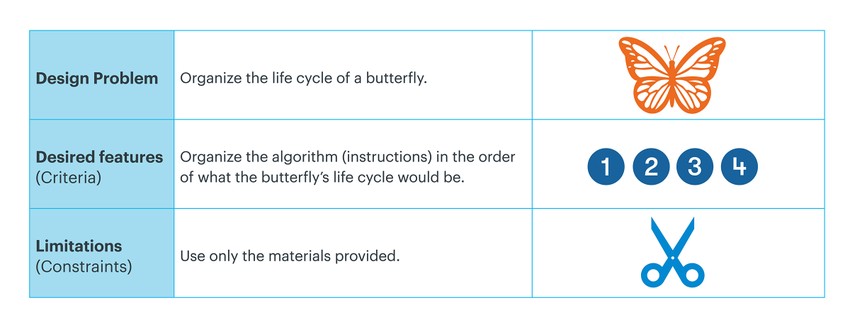
The design problem is to organize the life cycle of a butterfly. The desired features or criteria are to organize the algorithm (instructions) in the order of what the butterfly's life cycle would be. The limitations or constraints are that you can only use the materials provided.
- Place students in pairs and provide the pre-filled
Life Cycle and Phase Cards or blank note cards/sticky notes.
- If you did not pre-cut materials, give students a few minutes to cut the cards before beginning the activity.
/-/https/www.sciencebuddies.org/cdn/Files/19033/5/ButterflyAlgo-design-table-1.jpg)
Creating Algorithms (10 min)
- Students should discuss what they know about butterflies and life cycles with their partner.
- If you provided the blank set of cards instead of pre-filled cards, have students draw the different stages at this time.
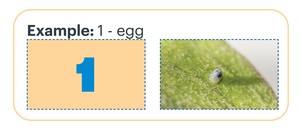
- As they discuss, students should organize the images and numbers in the correct order (1- egg, 2- pupae, 3- cocoon, 4- butterfly).
- Once most groups have their images sorted, ask for a couple of volunteers to share their algorithm or sequence and the reasons for why they chose that order.
- Encourage students to use the following sentence frames when sharing:
- During phase one it's a ________ because________.
- During phase two it's a ________. I know this because _______.
/-/https/www.sciencebuddies.org/cdn/Files/19034/5/ButterflyAlgo-example-egg.jpg)
For additional reading and writing practice, have students write the words for each phase (egg, pupae, etc.) themselves and provide a space where they can practice filling in the sentence frame.
CT and Programming Concepts (10 min)
- Next, tell students that they are going to think like computer scientists and use the language a computer would need to understand this algorithm.
- Refer back to the scenario and remind them that they are going to create a computer model, so they'll need to think about how they can give their instructions to the computer.
- Tell students they are going to use something called conditionals.
- Share the definition and the real-world example so that they can see how they already use algorithms every day.
- Point out the "If/Then" phrasing in many of the examples of conditions. This language is also used by computer programs when communicating conditions.
- Show students how they can add conditionals to their algorithm with if/then cards.
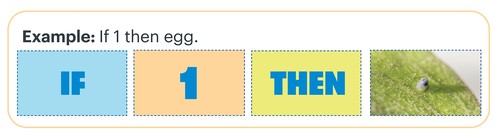
- IF phase THEN image
- Demonstrate the first phase for them: If the phase is 1, then the image will be an egg.
- Pass out the If/Then cards at this time or have students write the completed sentence frames on blank cards.
- Encourage students to verbally practice the conditional phrases and share their work with another pair or the rest of the class.
/-/https/www.sciencebuddies.org/cdn/Files/19035/5/ButterflyAlgo-if-then-egg.jpg)
Real-world Conditionals
- If you finish your homework early, then you can play outside with the neighbor.
- If you eat your dinner, then you get dessert.
- If the weather is rainy, then you need an umbrella.
- New Species: Have students apply this process to develop algorithms for another species such as a frog or apple tree. Have them practice adding additional steps depending on the number of phases of development for that species.
For example:
- Frog: egg, tadpole, tadpole with gills, froglet (tadpole with legs), adult frog
- Apple Tree: seed, sprout, sapling, tree with flowers, tree with fruit
- Real-world Conditionals: Have students research or provide information on some of the conditions needed for a Monarch butterfly to survive and move on to the next phase of development (ex: temperature, weight, food, etc.). Have them practice replacing the number in the algorithm with the specific conditional. For example: If caterpillars shed their skin five times, then pupae.
Debrief (5 min)
- Lead a short debrief with students which focuses on their use of computational thinking and algorithms.
- Help students make connections between the skills they used in this activity, the work of computer scientists, problem solving, and other processes in their daily life. Reinforce these real-world applications and build their ability to use computational thinking in any setting.
- Possible Debrief Questions include:
- What steps did your group take to solve the problem of organizing the butterfly's life cycle? (What was your algorithm?)
- Where else do you use algorithms in your life?
- To deepen the connection with computer science, additional Debrief Questions can include:
- How did you use computational thinking to solve this problem? (How did you think like a computer scientist?)
- Can you think of any other examples of "if/then" phrases you might use in your day to day life? Ex: If it's a hot day, then I will wear shorts.
Note: Students will need to refer to their algorithm again during the Plugged Design Challenge. Have them keep their cards, or post one set where all students can see the algorithm as you are programming on the computer.
The rest of this lesson will use the Scratch Program: Butterfly Algorithms. Before doing this plugged challenge with your students, check these step-by-step video resources:
- Programming Butterfly Algorithms on Scratch: Essentials (10:05 min)
- Programming Butterfly Algorithms on Scratch: Extensions (6:08 min)
(See playlist for Spanish captions.)
If you need more support, review:
- The Tech Interactive's Computer Programming Tech Tip
- Getting Started Tutorial on Scratch
- Educator resources on Scratch
These are the names and functions of the blocks you will be using to code this program:
/-/https/www.sciencebuddies.org/cdn/Files/19037/5/butterfly-algorithm-operators.jpg) |
/-/https/www.sciencebuddies.org/cdn/Files/19038/5/butterfly-algorithm-if-then.jpg) |
/-/https/www.sciencebuddies.org/cdn/Files/19039/5/butterfly-algorithm-switch-costume.jpg) |
|
| Phase: Variables store information and keep count of something. In this case the block is counting what phase we are in. | Operators: Arithmetic blocks—have math operations and logical operators (and, or, not). This checks if the Phase (variable) is equal to a something specific, in this case a number. | If/Then Conditional: Logic control blocks that are commonly used in programming languages. This block is used to check the validity of a condition. If the condition is true, then it will do something. | Switch Costume: Looks blocks change how the Sprite looks and can be customized. In this case we are changing the Sprite to be an image of one of the phases of the Monarch butterfly. |
/-/https/www.sciencebuddies.org/cdn/Files/19036/5/butterfly-algorithm-phase.jpg)
Plugged Design Challenge
Introduce the Plugged Challenge (5 min)
- Revisit the design scenario. Explain that, now that they used computational thinking, they will be creating a computer model. Computer scientists and entomologists! You studied the life cycle of a butterfly and used computational thinking to organize it into an algorithm. Next we will use that algorithm to create a computer model that people can use at a museum to learn about a butterfly's life cycle.
- Share the updated design problem, desired features and limitations. Address any questions students have.
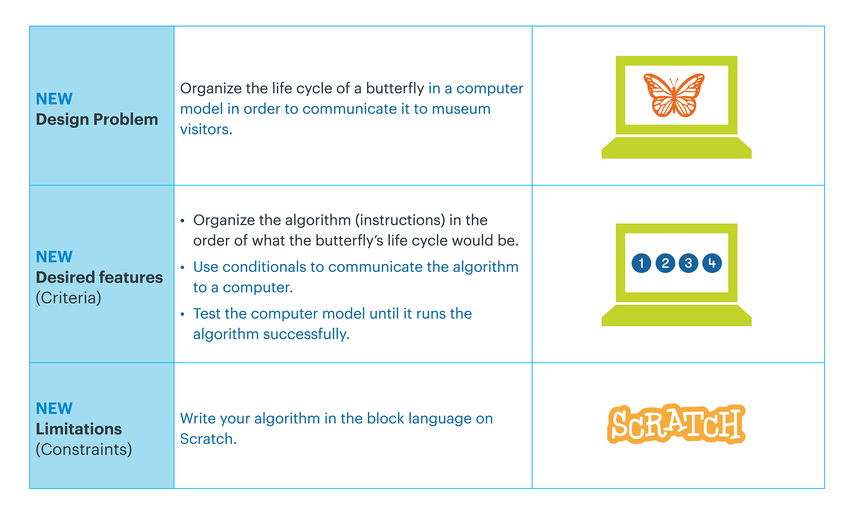
The new design problem is to organize the life cycle of a butterfly in a computer model in order to communicate it to museum visitors. The first desired features or criteria is the same as previously: to organize the algorithm (instructions) in the order of what the butterfly's life cycle would be. The first new desired feature is to use conditionals to communicate the algorithm to a computer. The second feature is to test the computer model until it runs the algorithm successfully. The new limitation or constraint is to write the algorithm in the block language on Scratch.
- Open the Scratch program and project it for the students.
/-/https/www.sciencebuddies.org/cdn/Files/19032/6/ButterflyAlgo-design-table-2.png)
Model on Scratch (13 min)
- Run the Butterfly Algorithms Scratch program by clicking the
green flag, then the space bar and advancing through the phases on the slider bar.

- Ask students:
- What did you notice about the computer program?
- Was there anything missing?
- Click "See inside" to show students the code behind the program.

- Click on the Life Cycle sprite.
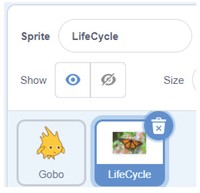
- Focus on the "If/Then" conditionals in the code.
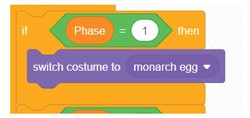
- Call on different pairs of students to provide you with directions for how to complete the code so that the phases will change when the slider bar is moved.
- Have students reference and use their algorithm to determine the "code" (blocks) that are missing.
- After each "if then" conditional has been added, test the program to ensure that it works as expected.
- Click the green flag, then press the space bar, and drag the slider bar to see if the images change for each phase.
- Continue coding the remaining conditionals and test after each addition until the program displays the butterfly life cycle.
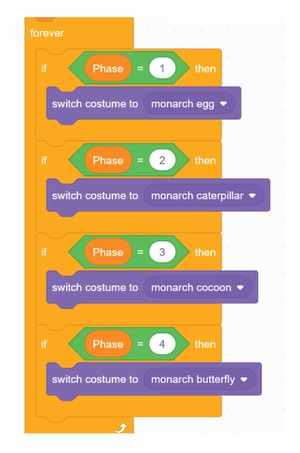
Forever block includes the following if then blocks. If phase equals 1, then switch costume to monarch egg. If phase equals 2, then switch costume to monarch caterpillar. If phase equals 3, then switch costume to monarch cocoon. If phase equals 4, then switch costume to monarch butterfly.
/-/https/www.sciencebuddies.org/cdn/Files/19087/7/ButterflyAlgo-green-flag-stop-sign-slider-2.jpg)
/-/https/www.sciencebuddies.org/cdn/Files/19042/5/butterfly-algorithm-see-inside.jpg)
/-/https/www.sciencebuddies.org/cdn/Files/19043/5/butterfly-algorithm-sprite-life-cycle.jpg)
/-/https/www.sciencebuddies.org/cdn/Files/19044/5/butterfly-algorithm-if-then-blocks.jpg)
/-/https/www.sciencebuddies.org/cdn/Files/19045/5/butterfly-algorithm-forever-blocks.jpg)
- Encourage students to give explicit directions and follow their instructions exactly. Learning from mistakes and fixing bugs are part of coding!
- Try "accidentally" coding incorrectly and have students help you debug the program.
When reviewing the code, verbally explain or write the following algorithm in plain English where all students can see it:
- When the space key is pressed,
- the costume will go to the position of (x:11, y:7).
- The costume image will show up (you can see a different image than from the beginning).
- Set the Phase slider to 1.
- The variable slider will show a Phase.
- Forever do the following:
- If the phase equals 1, then switch the costume to monarch egg.
/-/https/www.sciencebuddies.org/cdn/Files/19046/6/ButterflyAlgo-scratch-beginning-2.jpg)
Note: If you have devices and students are comfortable with Scratch, pair them up and have them try completing the code themselves after you have demonstrated the first step for them.
Programming Concepts (7 min)
- Help students make connections between the skills they used in this activity and those of computer scientists. Encourage students to share what they remember about the programming concepts used including algorithms and conditionals.
- Project the code of the program. Go through it and ask students to identify where the conditionals are—guide them if necessary.
- They should be able to identify 4 conditionals, one for each phase.
- Have them trace the block in the air with their finger and ask, what do you notice about the conditional block?
- Guide them to notice that the conditional block encompasses each phase of the life cycle and remind them that this is called a "conditional."
- Have students explain how conditionals work by asking questions like:
- What would happen if we changed the number?
- What would happen if we changed the costume?
- What would happen if we added a phase?
- To deepen understanding of the code ask: Why do you think we need the "forever" block?
- The forever block allows the user to go back and forth and see the different stages of the cycle instead of only seeing them once. Try removing it and see what happens!
- New Species: Have students apply this process to adjust the program for another species. There are images of frogs and apple trees in the Life Cycle Sprite costume library that can be used. Have students practice adding additional conditionals depending on the number of phases of development for that species.
- Tinker: Have students add text or sounds to the program as well so that they appear when the slider is moved. They can have this text and audio give facts about the life cycle.
Resources
- See the Extensions video (6:08 min) for detailed directions.
- Check out these Scratch tutorials for tips as well.
- Use the following Scratch Coding Cards with students for additional support:
- Say something
- Change costumes
- Change backdrops
- Add a sound
Flowcharts: Students who are more familiar with computational thinking may benefit from organizing their instructions in a flowchart.
- A flowchart is another way to write an algorithm.
- A flowchart convention might use:
/-/https/www.sciencebuddies.org/cdn/Files/19047/5/butterfly-algorithm-flowchart.png)
Debrief (5 min)
- Lead a short debrief with students which focuses on programming, algorithms and conditionals.
- Possible Debrief Questions include:
- How is our program like the algorithm you each created with the cards? How is it different?
- What was the order/sequence/algorithm our program followed?
- What programming concepts did you use today?
- What did you find interesting about the process? What did you find challenging?
/-/https/img.youtube.com/vi/ZaTKVjxt_kQ/0.jpg)
/-/https/img.youtube.com/vi/liSEwqdq7aA/0.jpg)
/-/https/img.youtube.com/vi/yBgMJssXqHY/0.jpg)