/-/https/www.sciencebuddies.org/Files/21464/5/sb-logo.png)
/-/https/www.sciencebuddies.org/Files/21464/5/sb-logo.png)
Abstract
Using artificial intelligence (AI) is easier and more accessible than ever! In this project, you will teach an AI to solve any maze. This project requires little to no coding skills; instead you will need curiosity, creativity, and a critical eye. Why not give it a try yourself?Summary
/-/https/i.ytimg.com/vi/QUNM-QyM5PA/maxresdefault.jpg)
Objective
Build the most efficient maze-solving artificial intelligence (AI) possible by tuning the AI's reward system.
Introduction
/-/https/www.sciencebuddies.org/Files/19813/7/maze-star.png)
Imagine you're in a new neighborhood, and you want to explore without a specific destination in mind. You might decide to take random turns and see what you come across, like discovering a local park or a tasty taco truck. Once you find these places, you might try different paths to see if there's a quicker or easier way to get there, or choose to stick to the same path you took the first time. This is how humans explore and navigate through unfamiliar areas, but how can we teach computers to do the same thing? The answer is artificial intelligence!
Artificial intelligence (AI) is a branch of computer science focused on building tools that can solve problems and analyze information. Machine learning is a subdivision of AI. Its goal is to create tools that can learn and improve over time using data. Just like a person learns and gets better with feedback and practice. In this engineering project, you will teach a computer agent to explore a maze using a special machine learning technique called reinforcement learning, more specifically Q-learning.
Unlike traditional computer programs, where decisions and rules are pre-programmed by humans, reinforcement learning is a type of machine learning that allows programs to learn and make decisions on their own. Instead of being given specific instructions, these programs learn from their experiences. In traditional programming, a programmer would tell the computer exactly which steps to take for each maze it encounters. For example, "Go right two steps, then down four steps, and then go right three steps." But with reinforcement learning, the computer can learn how to navigate through any maze on its own! It does this by playing the maze game many times, and every time it makes a mistake, it learns from it. Over time, it gets better and better at finding the right path in all kinds of mazes, without you having to tell it the steps for each maze separately. This is the big difference between normal programming and reinforcement learning. Reinforcement learning lets the robot learn from experience, like how we learn from our mistakes and get better at things over time. It's a smart way for the robot to solve many different maze puzzles efficiently without needing a special program for each one.
Reinforcement learning uses trial and error. Imagine we have a computer program, which we can call the "agent", that needs to find its way through a maze. The maze is like a puzzle, and the computer's agent is like a little robot trying to solve it. Every time the computer's agent makes a move in the maze, it interacts with the maze, which we call the "environment." The environment responds to the agent's actions, telling the agent if it made a good move or a wrong move.
When the agent does something good or gets closer to finding the right path, the environment rewards it by giving it points. On the other hand, if the agent does something wrong or goes the wrong way, the environment might give it a small punishment, like taking away some points. The agent learns from these rewards and penalties. It tries to get the most points possible by figuring out which actions lead to more rewards and fewer punishments. Over time, by exploring and learning from its mistakes, the computer's agent becomes more skilled at navigating the maze efficiently.
In this project, we will be using Q-learning, a method in reinforcement learning where a machine learns to make decisions by using a table to remember which actions are best in different situations. Watch this video for a simple and clear introduction to reinforcement learning:
/-/https/i.ytimg.com/vi/nIgIv4IfJ6s/maxresdefault.jpg)
What makes reinforcement learning special is that it can learn from large amounts of data and find patterns that might be difficult for humans to spot. It doesn't need human intervention all the time because it can keep learning and getting better on its own.
But reinforcement learning has its limitations. Reinforcement learning can be time-consuming and require a lot of data and training to achieve good results. It might not always find the best solution due to the trial-and-error nature of learning, it can struggle in situations with too many possible actions, and it can be sensitive to changes in the environment or input data, requiring frequent retraining.
In this maze navigation challenge, we will give you the basic code for the maze-solving agent. You will take that basic code and explore how changing the reward and punishment values change the agent's ability to learn the shortest path out of the maze. Your goal is to tune the agent so that it becomes the best maze-solving AI possible!
Terms and Concepts
- Artificial Intelligence
- Machine Learning
- Reinforcement Learning
- Q-learning
- Agent
- Environment
- State
- Exploration vs. Exploitation
- Reward
- Penalty
- Episode
Questions
- What is reinforcement learning, and how is it different from other types of machine learning?
- What is the main goal of the agent in the maze? How does it know when it has completed its task?
- Why do we use rewards in reinforcement learning? How do rewards affect the agent's actions?
- Can you explain in simple terms how the agent learns to navigate the maze using Q-values?
- Why is it important for the agent to explore the maze? How does it decide when to try new paths and when to stick to what it knows?
Bibliography
- Crash Course. (Oct. 11, 2019). Reinforcement Learning: Crash Course AI #9. Retrieved July 29, 2023.
- deeplizard. (Oct 5, 2018). Q-Learning Explained - A Reinforcement Learning Technique. Retrieved July 29, 2023.
- deeplizard. (Oct 10, 2018). Exploration vs. Exploitation - Learning the Optimal Reinforcement Learning Policy. Retrieved July 29, 2023.
- Doga Ozgon. (Jan 23, 2021). Google Colab Tutorial for Beginners | Get Started with Google Colab. Retrieved July 31, 2023.
Materials and Equipment
- Laptop or Desktop computer
- Internet access
Experimental Procedure
/-/https/www.sciencebuddies.org/Files/20484/5/icon-gear.png)
Setting up the Google Colab Environment
- You will need a Google account. If you do not have one, make one when prompted.
- Download the maze.ipynb file from Science Buddies.
- Upload the file to Google Colaboratory (you will need to sign in to your Google account at this point or make an account).
- Read the Troubleshooting Tips and How to Use This Notebook sections. Follow the instructions you find there.
- Run the code block under Importing Libraries, to bring in all of the functions.
Occasionally, your Runtime may get disconnected and your local variables will be lost. If you find yourself getting NameErrors such as: name 'variable' is not defined, then you have two options.
- Run all of the cells by clicking on 'Runtime' at the top of the notebook then click 'Run all', or
- click on the current cell you are working on, then click 'Runtime' and 'Run before'.
Creating the Maze Environment
- The first thing you need to do is create a maze for your agent to learn to navigate. We have done this for you in the code provided. Read through the comments and code in the Creating the Maze Environment section of the Colab notebook to make sure you understand it.
- The maze is a 5 by 5 grid of rows and columns. The numbering for the rows and columns starts at 0. In figure 1, the coordinates (or location) of the start (S) are (0,0). The coordinates for the goal (G) are (4,4).
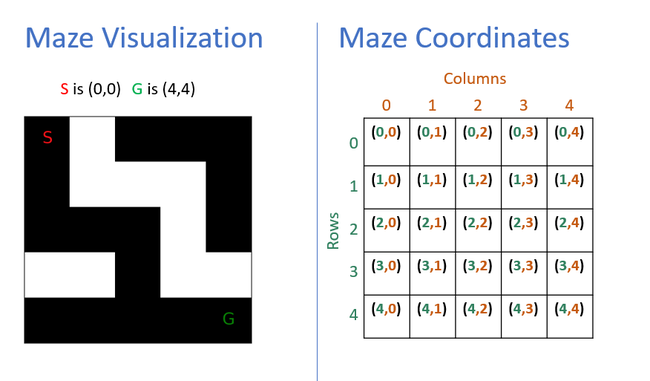
Figure 1. Coordinates are used in the maze class to tell the AI agent where the start and goal are in the maze. The coordinates are based on rows and columns starting at (0,0). - The code for the maze has a 0 (for an empty space) or a 1 (for a wall) for every block in the grid. You can see this in Figure 2.
- In the maze visualization the empty spaces are black and the walls are white. You can see this in Figure 2.
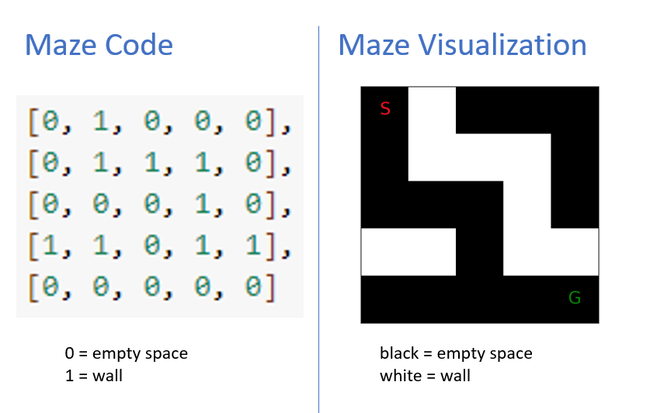
Figure 2. The code tells the AI agent where the empty spaces and walls are. We can visualize the maze using black for empty spaces and white for walls - The maze is a 5 by 5 grid of rows and columns. The numbering for the rows and columns starts at 0. In figure 1, the coordinates (or location) of the start (S) are (0,0). The coordinates for the goal (G) are (4,4).
- Decide if you will use the maze we have provided or create your own. To make your own maze, change the code for the maze and the coordinates for the start (S) and goal (G).
- The size of the maze is entirely up to you, but it's essential to ensure that both the start and goal positions are located within the maze boundaries and not within any walls. Avoid creating mazes that have no possible route to reach the goal from the starting point, as it would make the task impossible for the agent to learn.
- Run the code blocks for the maze class, and the maze visualization. Do this step even if you are using the maze we provided.
/-/https/www.sciencebuddies.org/Files/19799/8/maze-visulation-coordinates.png)
/-/https/www.sciencebuddies.org/Files/19800/8/maze-code-visualization.png)
Navigating the Maze Untrained
- We have provided the code that sets up the agent and defines the reward system for it. Read through and run the code blocks (without making any changes) labeled:
- Implementing the Agent
- Defining the Reward System
- Now that your agent has been created and a starting point for the reward system has been implemented, it is time to see how the agent does before it has been trained (learned).
- Run the Testing the Agent code block ten times. In a lab notebook, record the number of steps the agent used to travel between the start and the goal, as well as the total reward each time.
- Calculate the average steps and average reward across all ten test trials.
- Solve the maze yourself by hand. What is the fewest number of steps you can take to solve the maze? Write this in your lab notebook and compare it to the average number of steps the untrained agent took. How efficient was the untrained agent at solving the maze?
Training the Agent
- We have provided the code that defines the training function. Read through and run the code block labeled Setting Up the Reinforcement Loop. This code trains a reinforcement learning agent to navigate a maze using the Q-learning algorithm. The agent starts at the maze's initial position and selects actions based on the Q-table. It receives rewards and penalties for reaching the goal, hitting walls, or taking steps. The Q-table is updated during training to improve the agent's decision-making. After training, the average reward and average steps per episode are displayed, along with plots showing the training process.
- Now that we have the training function implemented, it is now time to train the agent. Run the Training the Agent code block. In a lab notebook, record the average steps and rewards during the training process. Both of these figures will be in the output of the cell.
/-/https/i.ytimg.com/vi/qhRNvCVVJaA/maxresdefault.jpg)
Evaluating the Agent
- Run the Testing the Agent code block ten times. In a lab notebook, record the number of steps the agent took to travel between the start and the goal, as well as the total reward each time.
- Calculate the average steps and average reward across all ten test trials.
- Compare how efficiently the untrained and trained agents were at solving the maze. How did the trained agent do compared to the fewest number of steps possible for the maze?
Experimenting and Improving
- Try experimenting with a different reward system to see how that affects how the agent learns. Copy or run this cell multiple times, changing the goal reward from 0 to 1, 10, 20, 30, etc... and to 100 and 1000. Keep track of the changes you make and the results in your lab notebook.
- Each time compare your results to the untrained agent, the ideal number of steps, and your previous results. Which reward system resulted in the agent learning how to solve the maze in the least amount of steps first? Which reward system most consistently results in the agent solving the maze in the same number of steps?
- Keep tweaking the reward system until you have a reward system that consistently performs well.

Ask an Expert
Variations
- Create new mazes and test how well the agent performs in more complex mazes with multiple paths and dead ends
Careers
If you like this project, you might enjoy exploring these related careers:
/-/https/careerdiscovery.sciencebuddies.org/cdn/Files/17070/11/pexels-photo-5716042.jpg)

/-/https/careerdiscovery.sciencebuddies.org/cdn/Files/1163/18/pexels-photo-1181472.jpg)
/-/https/careerdiscovery.sciencebuddies.org/cdn/Files/1011/20/pexels-photo-7375.jpg)

/-/https/img.youtube.com/vi/P6PGedCKrUM/0.jpg)
/-/https/img.youtube.com/vi/YFpOUGjUUXk/0.jpg)
/-/https/img.youtube.com/vi/00VXq03n_y0/0.jpg)